
WooCommerce to Shopify Sync Pro (W2S Pro) extends the free version with advanced controls designed for larger stores, complex catalogs, and agency-level workflows. Pro focuses on precision syncing, automation, and scalability, while maintaining the same safety standards required for live ecommerce stores.
This guide explains all Pro-only features, what problems they solve, and how to use them correctly.
Advanced Filtering #
Advanced filtering allows you to control exactly what data is synced, instead of syncing everything blindly. Filters are applied before sync execution, reducing unnecessary data transfers and preventing unwanted records from being created.
Product Filtering #
Product filters allow you to limit product sync to specific subsets.
Supported Product Filters
- Product status (Published, Draft)
- Stock status (In stock, Out of stock)
- Product categories
- Product tags
When to Use Product Filters
- Sync only active products
- Sync specific categories during migration
- Avoid syncing out-of-stock or draft products

Order Filtering #
Order filtering lets you control which orders are eligible for sync.
Supported Order Filters
- Order status (Processing, Completed, Cancelled, Refunded)
Common Use Cases
- Sync only completed orders
- Exclude cancelled or refunded orders

Customer Filtering #
Customer filters help limit customer sync to relevant users.
Supported Customer Filters
- WordPress user role
- Customer
- Subscriber
When to Use Customer Filtering
- Clean customer migration during store transitions

Category & Collection Sync #
W2S Sync Pro enables category synchronization between WooCommerce and Shopify. This sync works in both directions. Categories can be created, updated, or deleted
Supported Capabilities
- Category creation
- Category updates
- Category deletion
- Category hierarchy preservation
Important Notes
- Category images are not synced
- Category descriptions are not synced
- Category sync is independent of product sync
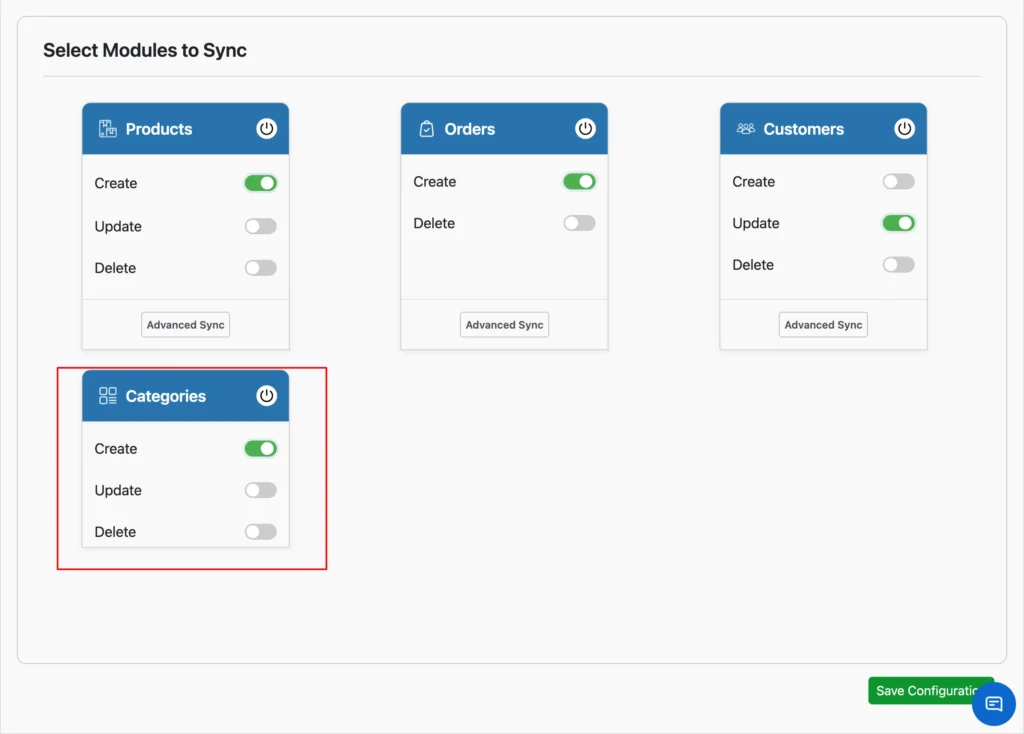
This feature is critical for stores that rely heavily on structured navigation.
Auto-Generate SKU #
SKU is mandatory for reliable product sync. W2S Pro includes automatic SKU generation for products that do not already have one.
How It Works
- Detects products missing SKUs
- Generates unique SKUs automatically
- Applies SKU during sync
- Prevents duplicate product creation
Auto-generated SKUs ensure accurate product matching across platforms.
Performance & Safety Enhancements #
Background Processing
All Pro sync operations run using background processing.
Benefits:
- No impact on frontend performance
- Safe for live stores
- Handles large data volumes reliably
Priority Support #
Pro users receive priority technical support, including:
- Faster response times
- Assistance with advanced configurations
- Help with large migrations
- Guidance for edge-case scenarios
Support covers both setup and ongoing sync operations.
Free vs Pro Comparison #
| Feature | Free | Pro |
| Product Sync | Yes | Yes |
| Order Sync | Yes | Yes |
| Customer Sync | Yes | Yes |
| Bidirectional Sync | Yes | Yes |
| Advanced Filters | No | Yes |
| Category Sync | No | Yes |
| Auto-Generate SKU | No | Yes |
| Background Processing | No | Yes |
| Priority Support | No | Yes |
Upgrading to Pro #
How Pro Works
W2S Pro works as an extension of the free plugin. The free plugin must remain installed and active.
Upgrade Steps
- Purchase W2S Pro
- Install the free W2S plugin (if not already installed)
- Install and activate the Pro plugin
- Pro features become available automatically
Best Practices for Using Pro Features #
- Test filters with limited data first
- Avoid enabling delete actions without verification
- Sync customers before orders
- Sync products before orders
- Review audit logs after bulk syncs
Support #
If you need help with Pro features, contact [email protected].