
Sync WooCommerce and Shopify — Both Ways, Without Manual Work
W2S – WooCommerce to Shopify Sync automatically keeps your products, categories, orders, and customers in sync between WooCommerce and Shopify. Built for ongoing automation not risky one-time migrations, W2S helps you run both stores together or expand to Shopify while keeping your data accurate and fully under your control.
- Bulk data sync with advanced filters for products, orders, and customers
- Create, update, and delete categories/collections between stores
- Real-time and scheduled sync options
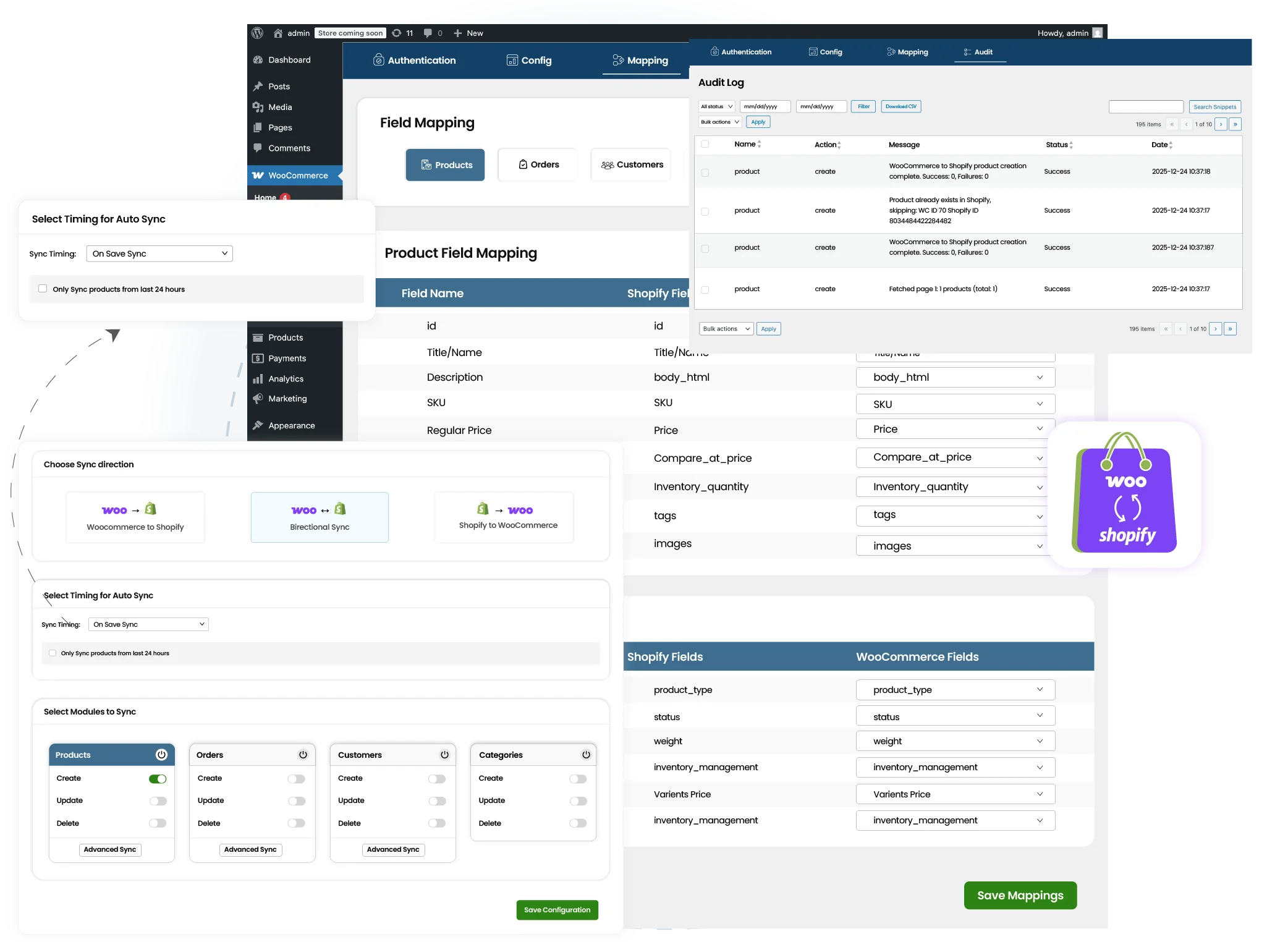
- Bidirectional or one-way sync between WooCommerce and Shopify

One Time Payment
Just pay once, and we promise no recurring fees

Unlimited Domain
Install the plugin on multiple sites you have

Free Lifetime Support
Get lifetime support and free upgrades with your purchase
Your Data Stays With You
Our WooCommerce to Shopify Sync plugin does not store, copy, or retain your store data on our servers. It simply connects your WooCommerce and Shopify stores through secure APIs and transfers the data between them. Once the sync is completed, nothing is saved or held by us. Your products, orders, customers, and inventory remain fully under your control at all times.
Managing WooCommerce and Shopify Stores Now Feels Lighter
Managing two ecommerce platforms often means double the work. Updating products twice, tracking inventory manually, and worrying about data mismatches. W2S removes that burden by turning WooCommerce and Shopify into a single, connected workflow. With flexible sync options, advanced filters, and automation built for live stores, you stay in control of what syncs, when it syncs, and how it behaves. Instead of juggling platforms, you can focus on running and growing your business, knowing both stores remain accurate, aligned, and up to date at all times.

Bidirectional WooCommerce ↔ Shopify Sync
Keep both platforms aligned with two-way or one-way sync at any time.

Advanced Sync Filters
Sync only what you need by category, stock status, product status, tags, order status, or roles.

Orders & Customers Sync
Go beyond products. Sync orders and customers automatically between stores.

Category Sync with Full Control
Create, update, or delete categories and map them to Shopify collections.

Real-Time & Scheduled Sync
Choose how and when data flows between your stores.

Background Processing
Safe for live sites. No store slowdown or downtime.
Types of Sync Workflows

Products → Products, Orders → Orders, Customers → Customers, Categories → Collections

Products → Products, Orders → Orders, Customers → Customers, Collections → Categories

Products ↔ Products, Orders ↔ Orders, Customers ↔ Customers, Categories ↔ Collections
Who Exactly Needs W2S - WooCommerce to Shopify Sync
W2S – WooCommerce to Shopify Sync is built for anyone who needs both platforms to work together without friction.
Store Owners

For merchants running WooCommerce and Shopify together who need accurate, automated data syncing without daily manual updates.
Growing Ecommerce Brands

For stores with large product catalogs, frequent stock updates, and ongoing order flow that require a reliable sync system.
Agencies & Developers

For professionals managing multiple client stores who need advanced filters, bulk sync, and complete control over data migration and updates.
How to Get Started
Getting started with W2S – WooCommerce to Shopify Sync is simple and doesn’t require technical expertise. You can set up your first sync in just a few steps and stay in full control of how your data moves between WooCommerce and Shopify.
Connect Your WooCommerce and Shopify Stores
Securely connect your Shopify store using API credentials as well as your WooCommerce store. This allows W2S to communicate safely between both platforms and ensures data is synced accurately without manual imports or exports.
Configure Sync Settings
Choose what data you want to sync, like products, orders, customers, or categories, and define how sync should behave. You can set the sync direction, apply filters, choose create, update, or delete actions, and select whether sync runs in real time or on a schedule.
Run Your First Sync
Once everything is configured, run your first sync with a click. W2S processes data in the background. If you enable on-save sync, the data will be synced instantly, or you can enable automation and let W2S handle day-to-day syncing for you.
Sync Complex Product Variations Without Hassle
W2S fully supports syncing simple, variable, and grouped products between WooCommerce and Shopify without breaking product structure. Product variations, attributes, pricing, stock levels, and SKUs are synced accurately, ensuring your catalog looks and behaves the same on both platforms. With auto-mapped fields, you don’t need to manually match product data, and the SKU auto-generation option helps maintain consistency even when products are created differently across stores. This makes W2S ideal for stores with large or complex catalogs that can’t afford product mismatches.

Sync Orders and Customers Between WooCommerce and Shopify
Unlike many tools that stop at product sync, W2S allows you to sync orders and customers between WooCommerce and Shopify as well. Orders created in WooCommerce can be sent to Shopify, and Shopify orders can be synced back to WooCommerce, keeping fulfillment, reporting, and customer records aligned. The plugin supports multiple order statuses and works with both real-time and scheduled sync, so updates happen exactly when you need them. Customer sync can be controlled by roles, allowing you to sync only relevant users, such as customers or subscribers, without cluttering your database with unnecessary records.

Automation & Scheduling That Fits Your Workflow
W2S is built for regular automation, not single-time migration. You can choose from real-time (on-save) sync or scheduled recurring sync, depending on how your business operates. For migrations or temporary setups, limited-duration sync allows you to enable sync only for a specific period and automatically stop once the job is done. You can choose to sync only products created within the last 24 hours, making updates more precise and avoiding unnecessary data transfers. This flexibility lets you automate daily operations, reduce manual intervention, and still maintain full control over timing and behavior.

Performance & Safety for Live Stores
All sync processes in W2S run using background processing, ensuring your live WooCommerce and Shopify stores remain fast and responsive. Even during bulk sync or large data transfers, your store’s performance is not affected. This makes W2S safe to use on production sites without downtime, slow pages, or customer-facing disruptions. Whether you’re syncing hundreds or thousands of records, the plugin is designed to handle it reliably while your business continues to run smoothly.

Pricing Plan
Free Forever
- Unlimited data sync
- Sync Simple & Variable Products
- Sync Orders & Customers
- Create/Update/Delete actions
- One-way sync & Bi-directional sync
- Real-time & Periodic Sync
- Sync products created within 24 hours
Advanced Features
- Grouped Products Sync
- Categories Sync
- Advanced Sync Filters
- Auto-generate SKU if missing
- One-Time Payment
- Unlimited domains
- No monthly or yearly fees
- Lifetime updates & priority support
Need a custom sync rule or a unique business workflow?
Our team can help extend W2S to support additional use cases or custom requirements. Reach out to discuss customization options.
How Syncing WooCommerce and Shopify Changes The Way You Work
Managing WooCommerce and Shopify manually quickly becomes time-consuming, error-prone, and hard to scale. W2S replaces repetitive admin work with automated, controlled synchronization so your stores stay aligned without constant oversight.
Task
Manual Management
With W2S Plugin
Frequently Asked Questions
1. What does WooCommerce & Shopify integration mean?
WooCommerce and Shopify integration means securely connecting both platforms so your store data stays synchronized automatically. With W2S, products, orders, customers, and categories can sync between WooCommerce and Shopify without manual imports, exports, or duplicate work. This integration helps businesses manage both platforms together while keeping data accurate and consistent.
2. How long does it take to set up the WooCommerce–Shopify sync?
Setting up W2S usually takes only a few minutes. After installing the plugin in WordPress, you connect your Shopify store using API credentials, choose what data you want to sync, and configure the sync rules. No technical coding is required, and most users can run their first sync shortly after installation.
3. Can I choose what data to sync between WooCommerce and Shopify?
Yes. W2S gives you full control over what data is synced. You can choose to sync products, orders, customers, and categories, and apply advanced filters to limit sync by category, stock status, product status, order status, or customer roles. This ensures only the data you need is synced, keeping both platforms clean and organized.
4. How often does data sync between WooCommerce and Shopify?
You can control how often data syncs based on your business needs. W2S supports real-time (on-save) sync and scheduled or recurring sync. This flexibility allows you to keep stores aligned instantly or update data at fixed intervals for better performance and control.
5. Will syncing affect my live WooCommerce or Shopify store?
No. W2S is designed to be safe for live stores. All sync processes run in the background, so there is no downtime or performance impact on your website. You can continue selling while data syncs securely between WooCommerce and Shopify.