WP Ultimate CSV Importer

The Only Import Export Plugin You’ll Ever Need for WordPress, WooCommerce & Multilingual Sites

WP Ultimate CSV (or XML) Importer is an all-in-one WordPress plugin for importing, exporting, and migrating your site data using CSV, XML, or Excel files. It lets you handle thousands of posts, pages, custom posts, custom fields, taxonomies, users, and much more with total control over data.

4.9/5 (2,500+ reviews)

wp-ultimate-csv-importer-pro-featured
One-Time-Payment

One Time Payment

Pay once and enjoy for a lifetime. No recurring fees.

Unlimited-Domain

Unlimited Domain

No limits, no restrictions use it on as many websites as you like.

Free-Lifetime-Support

Free Lifetime Support

Get dedicated, premium support for life with no extra charges.

Trusted by 60,000+ Bloggers/Business Owners/Agencies/Freelancers/Developers, including

groweb logo
Airtel
redegal.logo
accesed.logo
foxit logo
quote logo
provectuse logo
finonex logo
clickify logo
zenatta Logo
groweb logo
Airtel
redegal.logo
accesed.logo
foxit logo
quote logo
provectuse logo
finonex logo
clickify logo
zenatta Logo
groweb logo
Airtel
redegal.logo
accesed.logo
foxit logo
quote logo
provectuse logo
finonex logo
clickify logo
zenatta Logo
groweb logo
Airtel
redegal.logo
accesed.logo
foxit logo
quote logo
provectuse logo
finonex logo
clickify logo
zenatta Logo
groweb logo
Airtel
redegal.logo
accesed.logo
foxit logo
quote logo
provectuse logo
finonex logo
clickify logo
zenatta Logo
groweb logo
Airtel
redegal.logo
accesed.logo
foxit logo
quote logo
provectuse logo
finonex logo
clickify logo
zenatta Logo
groweb logo
Airtel
redegal.logo
accesed.logo
foxit logo
quote logo
provectuse logo
finonex logo
clickify logo
zenatta Logo
groweb logo
Airtel
redegal.logo
accesed.logo
foxit logo
quote logo
provectuse logo
finonex logo
clickify logo
zenatta Logo
groweb logo
Airtel
redegal.logo
accesed.logo
foxit logo
quote logo
provectuse logo
finonex logo
clickify logo
zenatta Logo
groweb logo
Airtel
redegal.logo
accesed.logo
foxit logo
quote logo
provectuse logo
finonex logo
clickify logo
zenatta Logo

A Complete WordPress Import Export Tool Your Site Needs

WP Ultimate CSV Importer is built to handle all your import export needs with ease. From posts to WooCommerce products import export, users to taxonomies import export, the plugin supports every post type with powerful advanced features like scheduling, data update, rollback, conditional filters, and much more to make your everyday import export tasks easier.

Import & Export Any WordPress Data

Import and Export Any WordPress Data

Transfer all types of content like posts, comments, products, orders, and other cpts, from one website to another. Useful for data migrations and everyday import export tasks.

Support-File-Format-You-Use

Support File Format You Use

Import and export not just with CSV. The plugin supports XML, Excel, TSV, zip, and many file formats. You can import and export data to & from Google Sheets.

Connect-with-Your-Favorite-Plugins

Compatible with your Favorite Plugins

Supports many plugins you are currently using in your WordPress. Works with plugins like JetEngine, Meta Box, Pods, Polylang, Rank Math, AIOSEO, and more.

Import-Straight-from-the-cloud

Import Straight from The Cloud

Skip downloading steps. Import data straight from cloud sources like Google Sheets or Dropbox for an even smoother workflow. Just add the file shareable link in CSV or other formats.

Keep-your-website-SEO-friendly

Keep your website SEO-friendly

Never lose your hard-earned rankings. Export and import SEO metadata to ensure every page and product stays search-optimized. Supports Slim SEO, SEOPress, and popular SEO plugins.

Import-with-Precicion-Every-Time

Import with Precision, Every Time

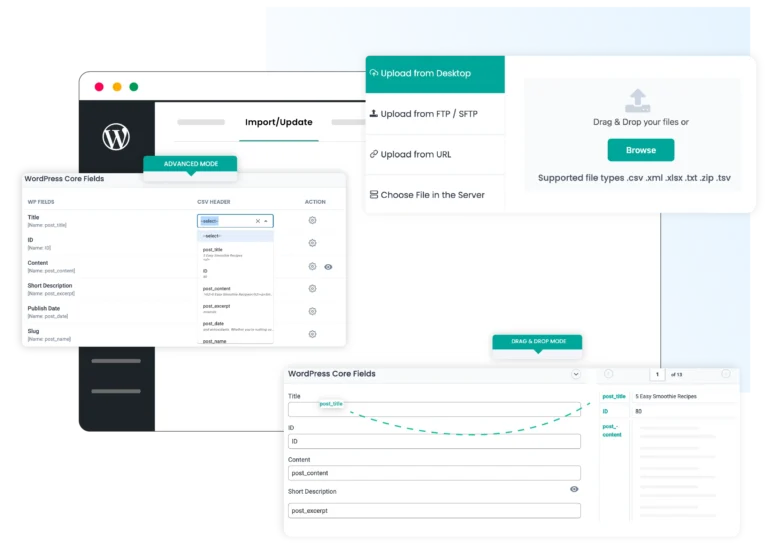
Use the drag and drop field matcher to map file columns to WordPress. Plus, save each mapping as a template for future imports and cut off your import configuration time in half.

Schedule-It-Forget-It

Schedule It and Forget It

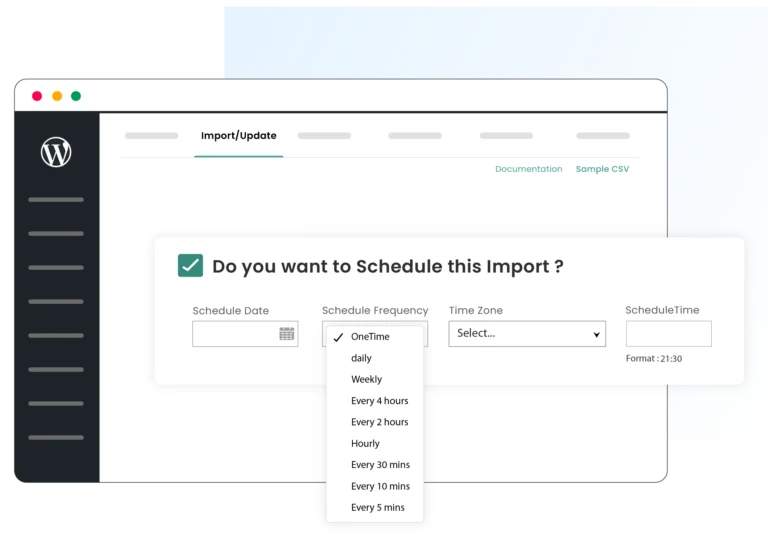
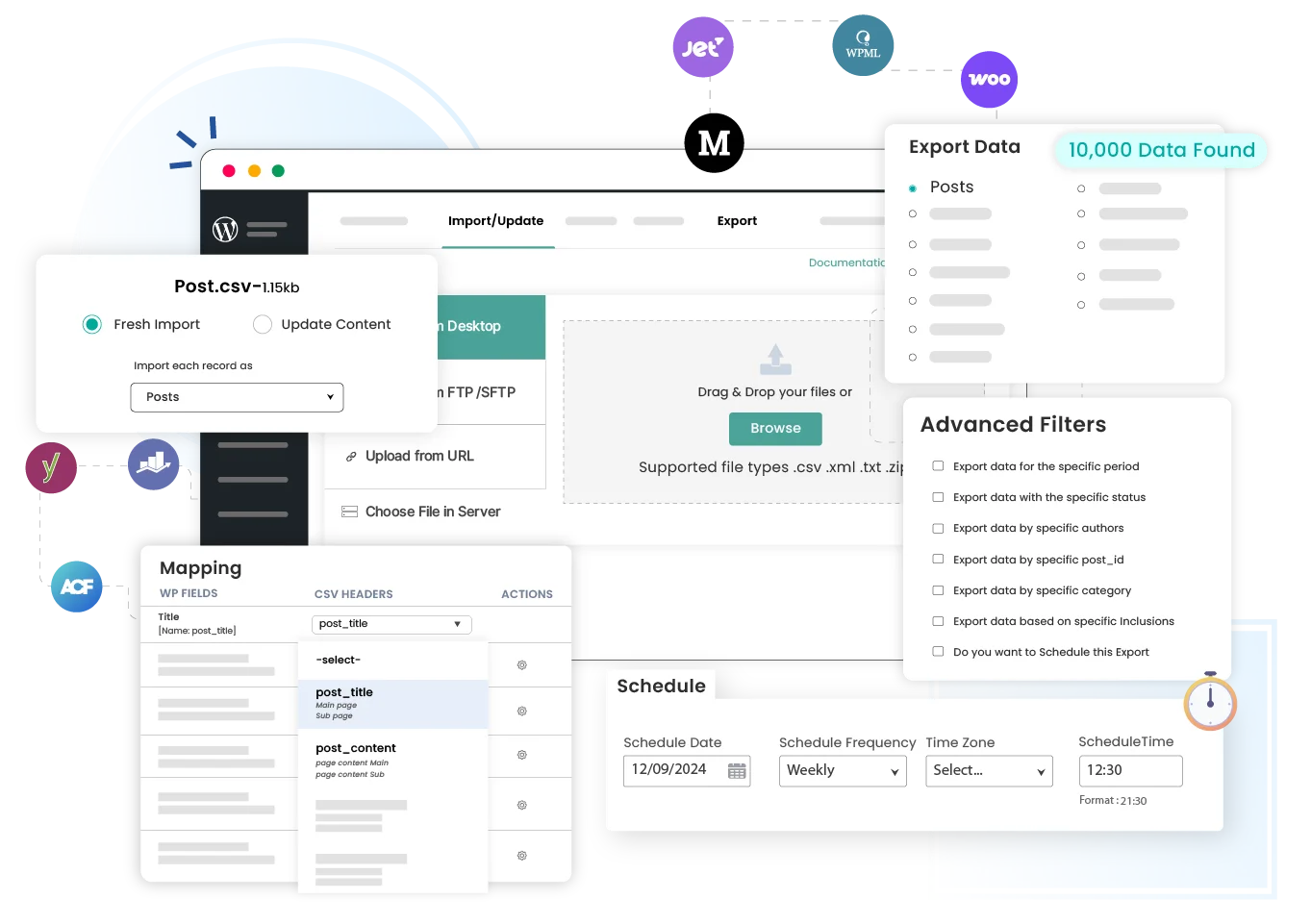
Automate imports & exports via FTP, SFTP, and Google Sheets. Whether it’s daily inventory updates or weekly backups, WordPress CSV Importer runs and handles them in the background.

Bulk-Updates-in-Munites

Bulk Updates in Minutes

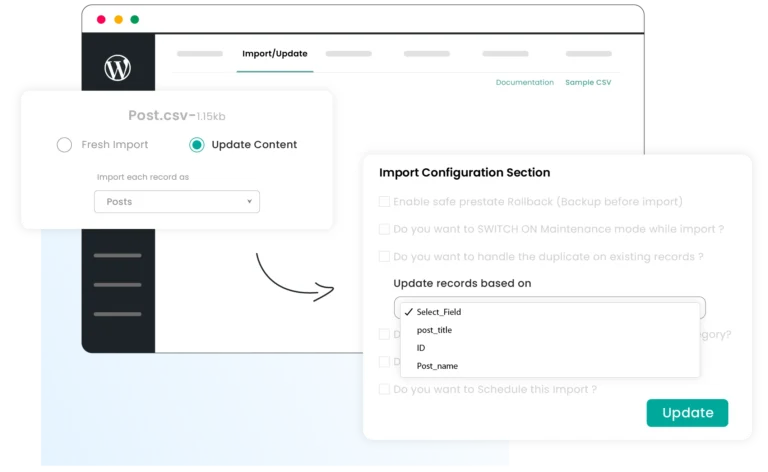
Keep your site always fresh. Update posts, products, and other items in bulk using identifiers like id, title, or slug. Perfect for WooCommerce stores and large content libraries.

Secure-Content-Backups-for-Peace-of-mind

Secure Content Backups for Peace of Mind

Protect your site data with advanced and recurring exports. Store your backups to Google Sheets or any file formats inside your FTP/SFTP location to restore and reuse when needed.

Save-Time-with-Reusable-Templates

Save Time with Reusable Templates

Stop doing the same import and export setup every time. Save field mapping as templates, download and import to your site whenever you need frequent updates.

See-Exactly-Whats-Imported

See Exactly What’s Imported

Verify every import with a detailed log to confirm what’s imported, skipped, quick errors, and a list of failed media. Ensuring your data transfers are stress-free.

Quick-Export-Import-Single-Record

Export & Import Single Record

Migrate an individual post or product record without exporting and importing an entire dataset. Perfect if you do frequent content updates. Export and import directly in edit view.

One-Click-Site-Migration-1

One-Click Site Migration

Save hours of time with one-click import and migration options. WP Ultimate CSV Importer bundles your content and plugin mapping, and other settings into a zip file to process your new import instantly.

Content-Creation-with-AI

Content Creation with AI

Generate content while importing for your products, page, or blog posts. Connect with any AI providers like Gemini, ChatGPT, or Claude and generate texts and images for your records.

Bulk-Import-Export

Large Import & Export without downtime

Move thousands of records with batch processing. WP Ultimate CSV Importer runs imports and exports in iterations, preventing server timeouts and keeping migrations and backups smooth.


How it works?

How the Import Works - Explained in 3 Simple Steps

Importing data with this WordPress CSV Importer is absolutely beginner-friendly. All it takes is three simple steps to complete your data import into WordPress.

Step 1

Upload File

Upload your CSV, Excel, or other file, or connect to external sources. Select your post type to begin.

{ } Step 2

Map Fields

Use the intuitive drag-and-drop or dropdown mode to map your file columns to WordPress fields.

Step 3

Import

Start the import and track progress in real time until your data import is 100% Complete.

How the Export Works - (3 Step Explanation)

Exporting data with this WordPress Ultimate CSV Importer is just as simple and straightforward. In three quick steps, you can export any WordPress data exactly the way you need.

Step 1

Choose What to Export

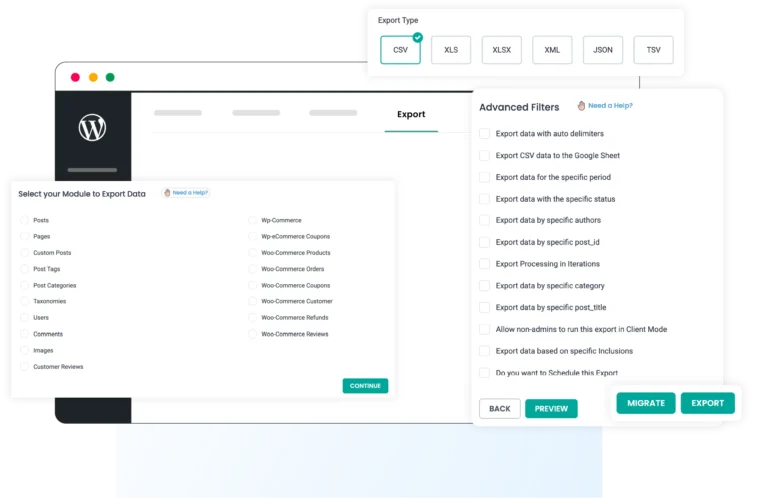
Select the post type, users, products, orders, or other data you want to export. Next, add a file name and choose a file type to export the records of your choice.

Step 2

Apply Filters for Export

Set up filters like specific post ids or titles, records created on a specific date, language, by author, and specific fields to extract only the records you want, nothing more.

Step 3

Run and Download the Export

Configure iteration options for large data. Preview the file to confirm the data format. Start the export, download the completed file, and verify successful export.

WP_mayor

Featured on WP Mayor – Trusted by WordPress Experts

Our plugin was recently reviewed by WP Mayor, a respected publication in the WordPress community. The review highlights how it simplifies the export and import process for agencies and professionals.

Get started with our free 7-day trial. Test every feature of the plugin in our trial instance before making your purchase decision.

Seamless Data Imports for WordPress

Seamless-Data-Imports-for-WordPress

Efficient & Bulk Content Updates

Efficient-Bulk-Content-Updates

Automated Scheduling for Easy Workflow

Automated-Scheduling-for-Easy-Workflow.

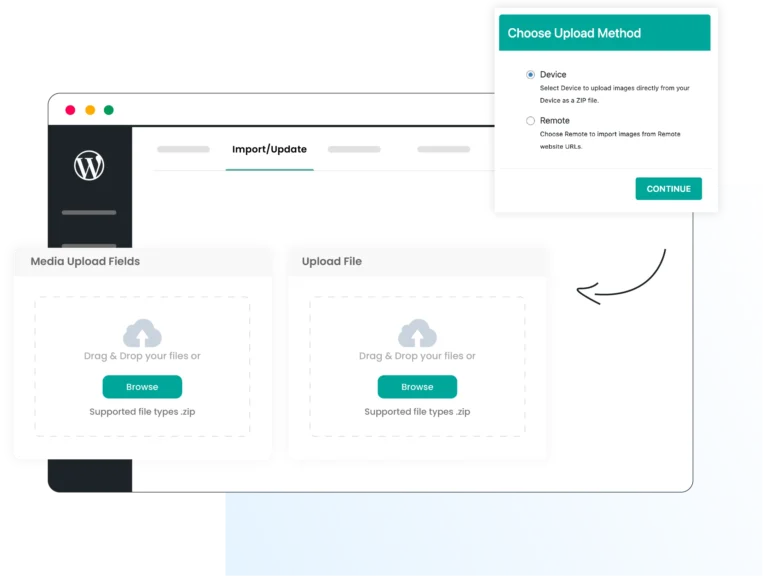
Simplified Media Management

Simplified-Media-Management

Powerful & Flexible Data Exports

Powerful-Flexible-Data-Exports

Explore Some Powerful Integrations

WP Ultimate CSV Importer integrates with many popular plugins, including your favorites like WPML, WooCommerce, JetEngine, Toolset, Meta Box, ACF, PolyLang, All In One SEO, Yoast, and Rank Math.

ACPT-logo
Woo-logo
FIFU-logo
ACF-log
MetaBox-logo
Yoast-logo
WPML-logo
Rankmath-logo
Ploylang-logo
Pods-logo
Toolset-logo
AIO-SEO-logo
Jet-engine-logo

WP Ultimate CSV Importer vs. Other WordPress Import Plugins

Features
WP Ultimate CSV Importer
Other Import Plugins
Import & Export Functionality
✅ Built-in import and export in one plugin
⚠️ Import only or export requires add-ons
Supported File Formats
✅ CSV, XML, Excel, TSV, ZIP, Google Sheets
⚠️ Limited formats
WooCommerce Support
✅ Included by default
❌ Requires paid add-ons
Multilingual Support
Supports WPML, Polylang and qTranslate X
⚠️ Limited or add-on based
SEO Metadata Support
✅ Yoast, Rank Math, AIOSEO, more
⚠️ Partial support
Lifetime Upgrades
✅ One-time purchase
❌ Annual or recurring pricing
Lifetime Support
✅ Included
❌ Limited or subscription-based
Unlimited Domain Usage
✅ Use on unlimited sites
❌ Site-limited licenses
Extra Plugins (Add-ons) Required
❌ No add-ons needed
Multiple paid add-ons required

See the Impact: Real Stories from Our Happy Customers!

All-in-One Import Export Plugin for WordPress

Custom Field Import

$249     $199

Save 20%

Import

Update

Media

Export

Schedule

Filter Control

Third-Party Integrations

ACF

JetEngine

MetaBox

SCF

Toolset

LMS

WPML

Woo & Addons

Yoast SEO

RankMath

AIOSEO

Directory Plugins

AI Integration

Polylang

One Time Payment | Unlimited Sites

Premium

$399     $299

Save 25%

Import

Update

Media

Export

Schedule

Filter Control

Third-Party Integrations

ACF

JetEngine

MetaBox

SCF

Toolset

LMS

WPML

Woo & Addons

Yoast SEO

RankMath

AIOSEO

Directory Plugins

AI Integration

Polylang

One Time Payment | Unlimited Sites

WPML Import

$249     $199

Save 20%

Import

Update

Media

Export

Schedule

Filter Control

Third-Party Integrations

ACF

JetEngine

MetaBox

SCF

Toolset

LMS

WPML

Woo & Addons

Yoast SEO

RankMath

AIOSEO

Directory Plugins

AI Integration

Polylang

One Time Payment | Unlimited Sites

Frequently Asked Questions

Have Questions About WP Ultimate CSV Importer ? Explore our most frequently asked questions below for quick answers. If you don’t find what you’re looking for, feel free to contact us.

1. Is the payment a one-time charge or recurring?

Yes, WP Ultimate CSV Importer Pro is a one-time payment. All plans (Premium, Custom Fields, and WPML) include lifetime updates and lifetime support, with no recurring fees. Once purchased, you can use the plugin permanently without renewal costs.

WP Ultimate CSV Importer is a complete WordPress import and export solution that supports all major post types and popular plugins, including WooCommerce, WPML, Polylang, ACF, Toolset, JetEngine, Meta Box, Yoast SEO, Rank Math, and AIOSEO. It offers powerful features like scheduling, conditional filters, WP-CLI support, custom functions, reusable templates, and large-file batch processing. What truly sets it apart from other import tools is its one-time pricing, lifetime updates, free lifetime support, and unlimited domain usage, making it one of the best and most cost-effective alternatives to the All Import plugin.

The Premium pack includes the full feature set. If you purchase only the WPML or Custom Fields pack, you may miss features like templates import export, custom posts, LMS, etc. For a full comparison, visit our pricing page.

Yes. WP Ultimate CSV Importer is fully compatible with WordPress Multisite, and you can activate and use it across all sites in your network without restrictions.

Our refund policy is available on the website. You can check the refund policy here. If you have questions before purchasing, feel free to contact our support team for clarification.

Yes. WP Ultimate CSV Importer supports full WordPress website migration, including posts, pages, custom post types, users, WooCommerce products, and media files. You can export data from your old site and import it into your new site with unlimited records.

You can access documentation, video tutorials, and step-by-step guides anytime. If you need personal help, contact our support team at [email protected]. We typically respond within 24 hours and assist with any import or migration issue.