
Table of Contents
For nearly two decades, setting up a WordPress site followed the same ritual. You’d purchase hosting, provision a server, configure a MySQL database, download the WordPress package, upload it via FTP, navigate the famous five-minute install wizard, and only then, after all of that, would you be ready to write your first post. It was the accepted cost of entry. We normalized it. We wrote tutorials about it. We built tools to speed it up.
But in March 2026, that ritual became a relic.
On March 11, 2026, WordPress.org officially launched my.wordpress.net. A free, fully functional, browser-based WordPress environment that requires absolutely nothing from you except a modern web browser. No signup form. No credit card. No domain registration. No server to configure. You navigate to the URL, and in seconds, you are inside a live, fully operational WordPress dashboard.
The setup time went from five minutes to zero seconds. That is not an incremental improvement. That is a paradigm shift.
This article is about understanding why that shift matters, not just for individual developers and content creators, but for the entire WordPress ecosystem and, arguably, for the future of web development as a discipline. We are witnessing the moment WordPress moves from being a destination you travel to, to a workspace that travels with you, living entirely inside your browser.
Key Takeaways
- Zero Setup, Instant Access — my.wordpress.net eliminates the traditional WordPress setup process entirely. No hosting, no database configuration, no domain required, just open your browser, and you’re inside a live WordPress dashboard in seconds.
- Your Data Never Leaves Your Device — Built on WebAssembly and SQLite, the entire WordPress stack runs client-side inside your browser. Your content is stored in IndexedDB, private by architecture, not just by policy.
- Persistent, Not Temporary — Unlike the original WordPress Playground, my.wordpress.net saves your work permanently in your browser’s local storage. Close the tab today, pick up exactly where you left off tomorrow.
- AI-Powered Built Right In — A native AI assistant is embedded directly into the environment, capable of writing code, modifying your site, and offering context-aware suggestions based on your actual local WordPress data. No third-party plugins needed.
- A Prototype Today, A Live Site Tomorrow — my.wordpress.net is not a dead end. Use it to design, test, and build. Then export your project with one click and import it into any traditional WordPress hosting environment when you’re ready to go live.
What is my.wordpress.net?
At its core, my.wordpress.net is a private, persistent, browser-based WordPress environment. Let’s break down each of those words because each one carries significant meaning.
Defining the Platform
- It is private: your site is invisible to the public internet. Unlike a traditionally hosted WordPress site, my.wordpress.net does not have a public IP address, DNS records, or a URL that anyone else can visit. It exists only in your browser’s local storage, accessible only to you on your device.
- It is persistent: unlike a demo or a staging environment that resets or expires, your my.wordpress.net site saves its state continuously. Close the tab and reopen it tomorrow. Your posts, settings, plugins, and theme customizations will all be exactly where you left them.
- It is browser-based: the entire WordPress stack, the PHP runtime, the database, and the file system run inside your web browser using WebAssembly technology. There is no server in the traditional sense. Your laptop or phone is the server.
Persistent vs. Temporary: The Evolution from WordPress Playground
If you’ve been in the WordPress community for a while, you’ll likely recognize the DNA of my.wordpress.net. It is the evolved, permanent successor to the WordPress Playground project, which launched as a temporary demo tool. The playground was revolutionary but ephemeral. Close the tab, lose everything. It was perfect for quick tests but impractical as a working environment.
my.wordpress.net solves that fundamental limitation. It introduces full persistence backed by the browser’s IndexedDB storage system. This transforms the concept from a cool technical demo into a genuinely useful tool you can build on day after day. Your private workspace is always there when you come back to it.
Privacy by Design
This is one of the most philosophically interesting aspects of my.wordpress.net. Privacy is not a setting you turn on. It is the architectural default. Because the site lives in your browser and not on any server connected to the web, there is simply no mechanism by which it can be publicly accessed. It is structurally private.
This makes it uniquely suited for use cases where confidentiality matters: personal journaling, private notes, drafting sensitive documents, or prototyping business ideas you are not ready to share. Your content is yours, stored on your device, not on someone else’s server.

WP Ultimate CSV Importer Pro
Get Ultimate CSV/XML Importer to import data on WordPress faster, quicker and safer.
The Technical Engine: PHP, Meet WebAssembly
To truly appreciate what my.wordpress.net achieves, you need to understand the technology that makes it possible. We are talking about a genuine engineering marvel, running a server-side scripting language inside a web browser.
WASM & SQLite: WordPress Runs Client-Side
Traditionally, WordPress requires a PHP-capable server and a MySQL or MariaDB database to function. Both of these are server-side technologies. A web browser is a client-side environment. Getting WordPress to run in a browser was, for a long time, considered impractical.
WebAssembly (WASM) changed the rules of that game entirely.
WebAssembly is a binary instruction format that allows code written in languages like C, C++, and Rust to run inside a browser at near-native speeds. The WordPress core team compiled the PHP interpreter itself into WebAssembly. This means your browser is literally executing PHP code, the same language that WordPress is written in, right there in the browser tab.
In place of MySQL, my.wordpress.net uses SQLite, a lightweight, serverless, file-based database, also running entirely within the browser environment. Together, PHP-WASM and SQLite create a complete WordPress stack without a single external server call after the initial page load.
Data Sovereignty: IndexedDB and Full Control
So where does your data actually live? It resides in IndexedDB, a low-level browser API designed for storing significant amounts of structured data on the client side. Think of it as a persistent database built directly into your browser.
The implications for data sovereignty are profound. Your WordPress posts, pages, settings, media, and plugin data are stored on your device, in your browser, not uploaded to a third-party server. No company has access to your content. There are no data residency concerns, no terms-of-service debates about content ownership, and no risk of a hosting provider going offline and taking your work with it.
You have 100% control over your data because it literally never leaves your computer. This is the local-first computing philosophy in its purest form.
WP Ultimate CSV Importer Pro
Get Ultimate CSV/XML Importer to import data on WordPress faster, quicker and safer.
The Integrated AI Workspace
If the browser-based WordPress runtime is the foundation, the integrated AI assistant is the feature that elevates my.wordpress.net from a technical curiosity to a productive, creative workspace.
The Built-in Assistant
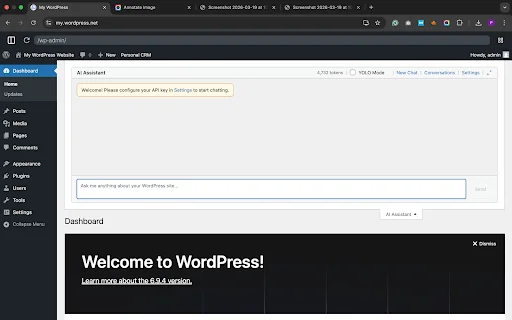
my.wordpress.net ships with a native AI chat interface embedded directly into the environment. This is not a third-party plugin you need to configure or a bolt-on extension. It is a first-class citizen of the platform. You can open the AI assistant and use natural language to accomplish tasks that would otherwise require writing code or navigating complex menus.
Need to modify a theme’s color palette? Ask the assistant. Want to write a custom PHP function to filter your post query? Describe what you want. Need to generate a block of content for a page you’re drafting? The AI handles it. The entire conversation and the resulting code changes are applied directly to your local WordPress environment in real time.
Knowledge Base Integration
What makes this AI assistant particularly powerful is its awareness of your local data. Because your WordPress site lives in the browser, the AI assistant has contextual access to your stored content, configuration, and structure. It’s not giving you generic WordPress advice. It can see your site’s specific setup and tailor its suggestions accordingly.
Imagine asking the assistant to review your existing posts and suggest a better content calendar structure, or to analyze your plugin configuration and flag potential conflicts. This level of context-aware assistance is only possible because of everything. The site, the data, and the AI coexist in the same browser-based environment.
How to Use my.wordpress.net: A Step-by-Step Guide
One of the great joys of my.wordpress.net is its simplicity. Here’s a complete walkthrough to get you from zero to a working WordPress environment.
Step 1: Instant Launch
Open any modern web browser and navigate to https://my.wordpress.net. That’s it. No account creation prompt will appear. No email verification required. Within a few seconds, you will be looking at a fully functional WordPress admin dashboard. The experience is genuinely startling the first time you see it; there’s a cognitive dissonance in seeing the familiar WordPress backend load without any of the preceding setup steps.
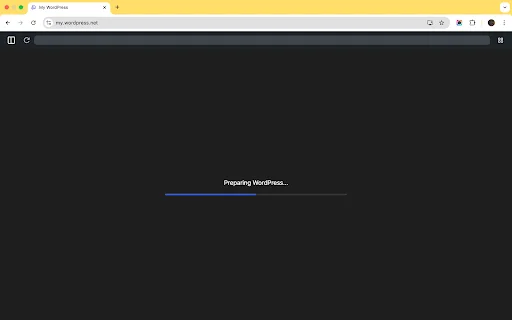
Open any modern web browser and navigate to https://my.wordpress.net. The moment the page loads, WordPress begins preparing itself automatically. No account to create, no email verification, no setup required.
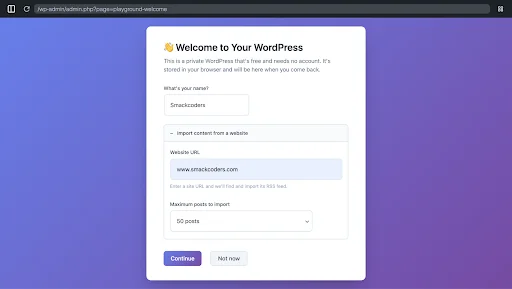
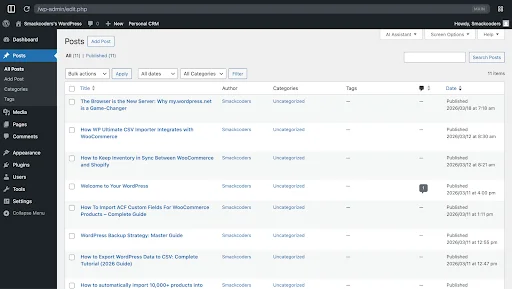
Once it’s ready, a prompt will appear on the same screen asking you to enter two things: a site name and a website URL to import blog posts from. This step is required to proceed. The URL tells WordPress Playground where to pull content from, and you can import up to 50 blog posts from that site to instantly populate your environment with real content.
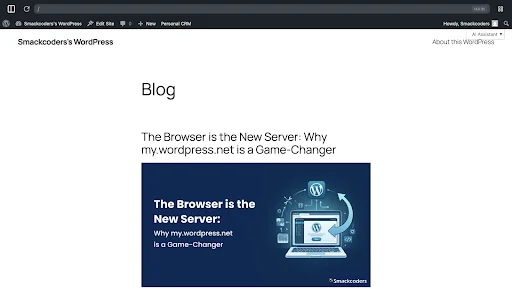
Once you’ve filled in both fields, click Continue. The importer gets to work pulling in the blog posts from that URL and displaying them inside your new WordPress site. In moments, you’re inside a fully configured WordPress dashboard with actual content already loaded.
What would normally take hours of hosting setup and content entry happens automatically in under a minute, right inside your browser.
Step 2: Exploring the App Catalog
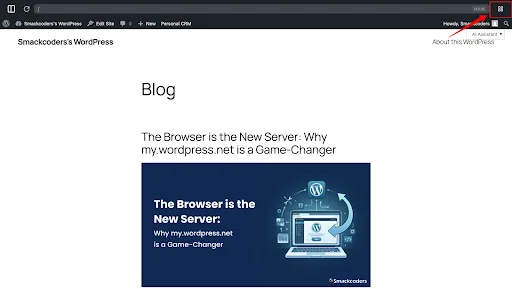
Once WordPress loads, you’ll land on your site’s dashboard with your imported blog posts already displayed. To explore the App Catalog, look for the grid icon (⊞) in the top-right corner of the admin bar, this is the App Launcher. Click it to open the WordPress Playground panel.
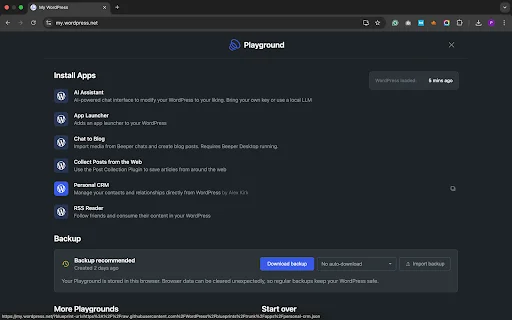
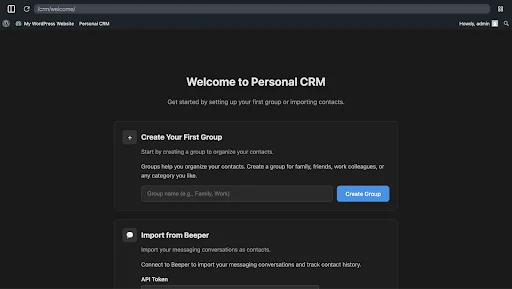
Inside the panel, you’ll find the Install Apps section with six ready-to-install tools, each adding a new capability to your WordPress with a single click:
- AI Assistant: An AI-powered chat interface that can modify your WordPress to your liking. You can bring your own API key or use a local LLM.
- App Launcher: Adds a quick-access app launcher directly to your WordPress admin bar.
- Chat to Blog: Import media from Beeper chats and turn them into blog posts. Requires Beeper Desktop running.
- Collect Posts from the Web: Uses the Post Collection Plugin to save articles from around the web directly into your WordPress.
- Personal CRM: Manage your contacts and relationships directly from WordPress, built by Alex Kirk.
- RSS Reader: Follow friends and consume their content inside your own WordPress.
Step 3: Backing Up Your Work
Since your entire WordPress site lives in the browser, protecting your work with regular backups is essential. The Playground panel makes this straightforward, click the grid icon in the top-right corner to open the panel and scroll down to the Backup section.
From here you can click Download backup to save a complete copy of your site to your device. You can also set up auto-downloads so backups happen automatically without you having to remember. The panel reminds you clearly: “Browser data can be cleared unexpectedly, so regular backups keep your WordPress safe.”
If you ever need to restore your site, simply click Import backup and upload your saved file to pick up exactly where you left off.
Bonus Point: Customizing with Blueprints
For power users and developers, Blueprints are where my.wordpress.net becomes extraordinarily flexible. A Blueprint is a JSON configuration file that defines a complete WordPress environment, which plugins are installed, which theme is active, what initial content is loaded, what settings are configured, and even custom PHP code to execute on initialization.
You can create a Blueprint for your standard development setup and load it with a single click, spinning up a fully configured WordPress environment in seconds. You can share Blueprints with colleagues or clients so they can replicate your exact setup without any manual configuration. For WordPress educators and workshop facilitators, Blueprints are a revolution; you can ensure every participant in a training session starts from the same environment.
Step 3: Customizing with Blueprints
For power users and developers, Blueprints are where my.wordpress.net becomes extraordinarily flexible. A Blueprint is a JSON configuration file that defines a complete WordPress environment, which plugins are installed, which theme is active, what initial content is loaded, what settings are configured, and even custom PHP code to execute on initialization.
You can create a Blueprint for your standard development setup and load it with a single click, spinning up a fully configured WordPress environment in seconds. You can share Blueprints with colleagues or clients so they can replicate your exact setup without any manual configuration. For WordPress educators and workshop facilitators, Blueprints are a revolution; you can ensure every participant in a training session starts from the same environment.
my.wordpress.net vs. Traditional Setup: Which is Right for You?
| Feature | my.wordpress.net | Traditional Hosting | Local Dev (DevKinsta etc.) |
|---|---|---|---|
| Setup Time | 0 seconds | 5–30 minutes | 10–20 minutes |
| Persistence | Browser Cache | Server Storage | Local Hard Drive |
| Public Access | No (Private) | Yes | No (by default) |
| Cost | Free | Paid Hosting | Free |
| Database | SQLite (browser) | MySQL/MariaDB | MySQL |
| Internet Required | Initial load only | Yes (for hosting) | No |
| Storage Limit | ~100MB | Hosting plan | Disk space |
| Portability | Export only | Full | Full |
When to Choose my.wordpress.net
my.wordpress.net is the right choice when your primary goals are speed, privacy, or experimentation. Specifically, consider using it for:
- Personal journaling and private writing: Because your content never leaves your browser, it offers a level of privacy no hosted service can match.
- Prototyping and concept testing: Spin up a new layout concept, test a plugin combination, or build a proof-of-concept without provisioning any infrastructure.
- Testing risky updates: Before applying a major plugin update or a PHP version upgrade to a production site, test it here first with zero risk.
- Learning and education: For anyone learning WordPress development, my.wordpress.net removes every infrastructure barrier. The focus can be entirely on learning the platform.
- Offline work: Once loaded, the environment functions without an active internet connection, making it useful for working on planes, trains, or anywhere connectivity is unreliable.
When to Stick with Traditional Hosting
my.wordpress.net is not a replacement for traditional hosting in every scenario. Choose a conventional hosting setup when:
- Your site needs to be publicly accessible, whereas my.wordpress.net is private by design.
- You are running an e-commerce store that processes real transactions.
- Your site receives significant traffic and requires server-side performance optimization.
- You need server-side caching, CDN integration, or server-level security configurations.
- Your site’s content must be accessible across multiple devices or shared with a team.
WP Ultimate CSV Importer Pro
Get Ultimate CSV/XML Importer to import data on WordPress faster, quicker and safer.
The Power & The Pivot: Key Features vs. Practical Reality
The Standout Features: Killer Apps of my.wordpress.net
Let’s give credit where it’s absolutely due. Several features of my.wordpress.net are genuinely category-defining:
- WASM-Powered Speed: The WebAssembly PHP runtime is remarkably fast. Navigating the admin interface feels snappy in a way that even some traditionally hosted WordPress sites struggle to match, because there are no network round-trips to a remote server.
- Local-First Privacy: As detailed above, the structural privacy guarantee is something no hosted alternative can provide. Your data literally cannot be accessed by anyone else.
- The Integrated AI Assistant: Having an AI that understands your specific local environment and can modify it through natural language is a genuine productivity multiplier, particularly for developers.
- Blueprint System: The ability to define, share, and instantly deploy fully configured WordPress environments as a JSON file is powerful for education, development workflows, and client onboarding.
- Zero Barrier to Entry: The complete elimination of setup friction is historically significant for the WordPress community’s mission to democratize publishing.
Why This Matters for the Industry
The WordPress mission statement is “democratize publishing.” For twenty years, even the most simplified WordPress hosting setups required a credit card, a domain name, a hosting account, and at least some patience with technical processes. That friction excluded millions of potential users.
my.wordpress.net eliminates that friction entirely. A student in a developing nation with only a borrowed laptop and a library’s WiFi connection can now be working in a full WordPress environment within seconds. A first-time creator who has never heard of cPanel or phpMyAdmin can explore the world’s most popular CMS without any of the traditional gatekeeping.
This is not a minor product launch. This is a structural shift in how WordPress enters the world.
The Constraints: A Reality Check
A balanced assessment requires acknowledging the current limitations:
- The 100MB Storage Limit: The browser’s IndexedDB storage is not unlimited. my.wordpress.net operates within a roughly 100MB environment. For a text-heavy personal site or a development sandbox, this is ample. For a media-rich portfolio or a large content library, it can become a genuine constraint.
- Cache Dependency: Your site’s persistence is tied to your browser cache. If you clear your browser’s storage, whether intentionally or through a privacy-clearing tool, your my.wordpress.net data will be deleted. Regular exports are strongly recommended as a backup habit.
- Single Device: Because the data lives in one browser on one device, you cannot pick up your work seamlessly on another machine without going through an export-import process.
- No Public Sharing: While this is a privacy feature, it is also a limitation for anyone who wants to share work-in-progress with a client or collaborator. You can share a Blueprint, but not a live, browseable site URL.
- Plugin Compatibility: While the vast majority of plugins work correctly, plugins that rely on server-side infrastructure (specific server modules, command-line tools, or certain filesystem operations) may not function as expected in the WASM environment.
Frequently Asked Questions (FAQs)
1. Is my site on my.wordpress.net public?
No. Your site exists only in your browser’s local storage (IndexedDB). It has no public URL, no server IP address, and no DNS record. No one can access or discover your site unless you explicitly export it, import it to a live hosting environment, or share a Blueprint configuration file.
2. Does it cost anything?
No. my.wordpress.net is a completely free service provided and maintained by the WordPress.org project. There are no plans, tiers, or hidden costs. Like WordPress core itself, it is open-source and free to use.
3. Will I lose my data if I close the tab?
No, not just from closing the tab. Your data is saved in your browser’s IndexedDB storage, which persists across sessions. You can close the tab, restart your browser, or even restart your computer, and your my.wordpress.net environment will be waiting for you when you return. However, if you use your browser’s “Clear Browsing Data” or “Clear Cache and Site Data” function, that storage will be wiped. Exporting your site regularly is the recommended safeguard against accidental data loss.
4. Can I install any plugin or theme?
Yes, with one practical caveat. You can install plugins directly from the official WordPress.org plugin repository or upload your own custom plugin files, just as you would on a traditionally hosted site. Similarly, you can install and switch themes freely. The only constraint is the overall 100MB environment limit. If installing a large plugin or uploading a media-heavy theme would push your environment over that storage ceiling, you may encounter issues. For the vast majority of plugins designed for standard WordPress use, this limit is not a practical obstacle.
5. Can I move my site from my.wordpress.net to a real host?
Yes, and this workflow is well-supported. my.wordpress.net includes a built-in Export function that generates a downloadable archive of your site’s content, settings, and (in some cases) file assets. You can then use the standard WordPress import tools on any traditionally hosted WordPress installation to bring that content across. For a more complete migration, including plugin files and theme customizations, you can export a full site zip and import it using migration plugins like Duplicator or All-in-One WP Migration on your destination host.
Conclusion: The Future of the WordPress Ecosystem
There is a version of this story that is purely technical, about WebAssembly, SQLite, and IndexedDB. That version is interesting and worth telling. But the larger story is about something more fundamental: a shift in what we believe software can be.
For decades, we accepted that a server-side application required a server. We accepted that “setting up WordPress” was a multi-step, multi-tool process that required at least some technical literacy. We built an entire industry of hosting providers, setup wizards, managed services, and migration tools around the assumption that WordPress fundamentally needed a server to exist.
my.wordpress.net challenges that assumption at its root. It demonstrates that WordPress is not a server-dependent application, it is a set of software logic that can run anywhere the right runtime exists. And increasingly, that runtime exists everywhere: in your browser, on your phone, in environments we haven’t even imagined yet.
WordPress is no longer just a Content Management System. With my.wordpress.net, it is becoming something closer to an operating system for digital work, a complete, self-contained environment for writing, building, prototyping, and thinking that lives entirely in your browser and travels with you wherever you go.
The five-minute install was a milestone. Zero seconds is a revolution. And for anyone paying attention to the future of the open web, that revolution is just getting started.
WP Ultimate CSV Importer Pro
Get Ultimate CSV/XML Importer to import data on WordPress faster, quicker and safer.
