
Table of Contents
WordPress websites are one of the most common targets for hackers, bots, and automated attacks because of their popularity and open ecosystem. Even small blogs and business sites face risks like brute force login attempts, malware injections, and spam traffic. Basic security settings alone are not enough to stop these threats effectively.
That is where WordPress firewall plugins play a major role. A firewall acts as a protective barrier between your website and incoming traffic, filtering malicious requests before they can cause damage. Among many available tools, two names are compared most often: Wordfence and Sucuri. In this guide, we will compare both plugins in detail to help you choose the right firewall solution.
Choosing the right firewall plugin is not just about installing security software; it is about understanding how different protection models work. Wordfence and Sucuri follow different firewall architectures, offer distinct features, and vary in performance impact and pricing. By analyzing their strengths, limitations, and use cases, you can make an informed decision that aligns with your website’s size, traffic, and security requirements.
Overview of Wordfence Security Plugin
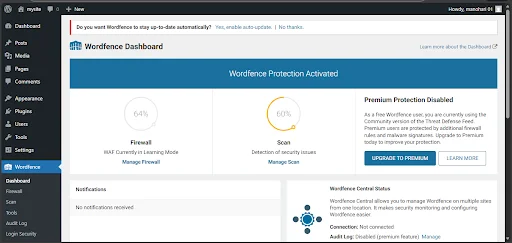
Wordfence is one of the most widely used WordPress security plugins. It provides firewall protection, malware scanning, login security, and real-time threat monitoring directly inside your WordPress dashboard. It is known for its detailed alerts and strong control options for administrators.
Wordfence uses an endpoint firewall model, meaning it runs within your WordPress environment. This allows it to deeply inspect requests and files but can also use more server resources compared to cloud-based solutions. It is popular among site owners who want detailed visibility and control over security events.
Key Features of Wordfence
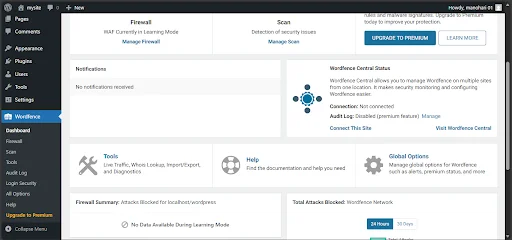
Wordfence includes a web application firewall, malware scanner, login protection tools, and live traffic monitoring. It also provides rule updates and threat intelligence feeds. Users can block IP addresses, countries, or suspicious behavior patterns directly from the dashboard.
Another strong feature is its alert system. Site owners receive notifications about file changes, plugin vulnerabilities, and suspicious login attempts. This makes it easier to react quickly to potential threats.
Wordfence Firewall Type
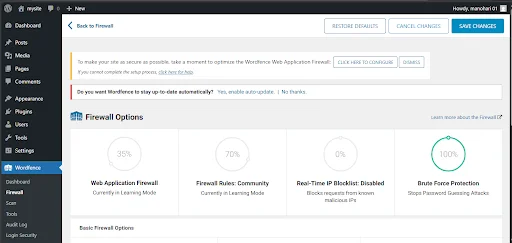
Wordfence uses an endpoint firewall. This means the firewall runs on your server after WordPress loads but before most plugins execute. It can analyze requests with high context because it understands WordPress structure and user roles.
However, since filtering happens on the server itself, heavy attack traffic can still consume server resources before being blocked. That is the main architectural trade-off of endpoint firewalls.
Malware Scanning Capabilities
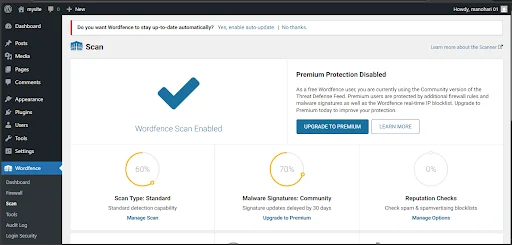
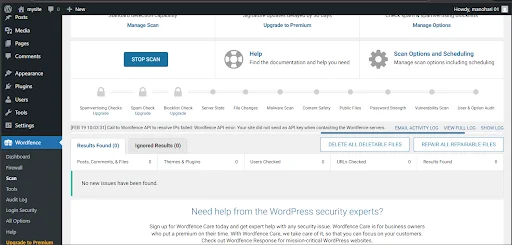
Wordfence includes a built-in malware scanner that checks core files, themes, and plugins for suspicious code and known malware signatures. It also compares your files with official WordPress repository versions to detect modifications.
The scanner can be scheduled and run automatically. Detailed scan reports help identify which files are risky and what action should be taken.
Login & Brute Force Protection
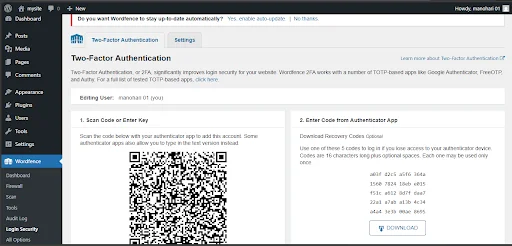
Wordfence offers strong login security controls such as brute force protection, login attempt limits, CAPTCHA support, and two-factor authentication. You can enforce strong passwords and lock out repeated failed login attempts.
These features are especially useful for sites that face repeated bot login attacks.
Overview of Sucuri Security Plugin
Sucuri Security is a website security platform that offers firewall protection, malware monitoring, cleanup services, and performance optimization. Unlike endpoint plugins, Sucuri is best known for its cloud-based firewall model.
Sucuri’s firewall sits between visitors and your server at the DNS level. Traffic is filtered in the cloud before it reaches your hosting environment. This reduces server load and blocks many threats earlier in the request lifecycle.
Key Features of Sucuri
Sucuri provides a cloud firewall, malware monitoring, blacklist monitoring, uptime tracking, and professional cleanup services in paid plans. It also includes virtual patching to protect against known vulnerabilities even before you update plugins.
It focuses on prevention plus post-hack recovery support, which is valuable for business websites.
Cloud-Based Firewall
Sucuri’s firewall is cloud-based, meaning traffic is routed through Sucuri’s network first. Malicious bots, exploit attempts, and DDoS patterns are filtered before they reach your server.
This approach reduces direct load on your hosting and can improve stability during attack spikes.
Malware Detection & Cleanup
Sucuri monitors website integrity and detects malware, defacements, and blacklist status. In paid plans, it also includes professional malware cleanup handled by their security team.
This is useful for site owners who prefer managed security response instead of handling cleanup themselves.
CDN & Performance Benefits
Sucuri includes a built-in content delivery layer along with its firewall. Cached content can be served from edge locations, which may improve loading speed for global visitors.
Because filtering happens before requests hit your server, performance often remains more stable under attack conditions.
Firewall Architecture Difference (Wordfence vs Sucuri)
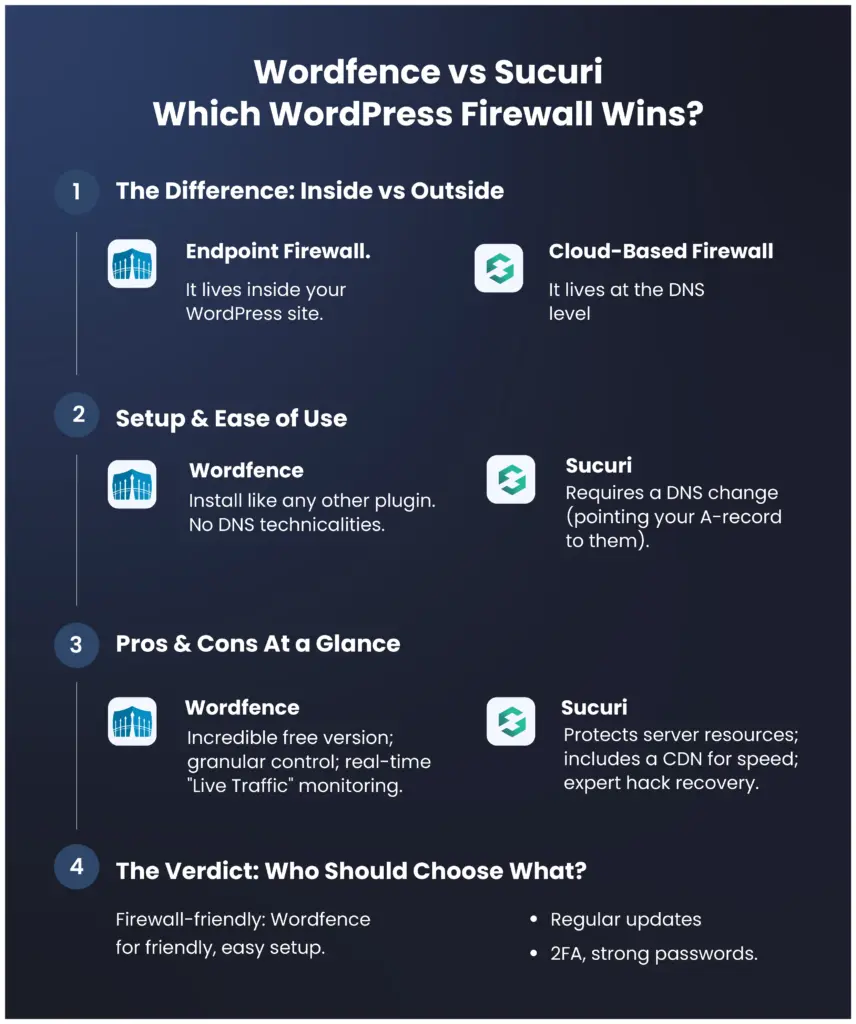
The biggest difference between Wordfence and Sucuri lies in how their firewalls are built and where traffic is filtered. Wordfence uses an endpoint firewall that runs directly inside your WordPress installation. This means every visitor request first reaches your server and then gets inspected and filtered by the plugin. It gives deep visibility and WordPress-aware filtering, but it still consumes server resources before blocking threats.
Sucuri uses a cloud-based firewall that sits in front of your website at the DNS and network level. Traffic passes through Sucuri’s security layer before it ever reaches your hosting server. Malicious requests are stopped earlier, which reduces server load and improves resilience during high-volume attacks. The architectural difference directly affects performance, scalability, and attack handling.
Feature-by-Feature Comparison
Both plugins provide strong security, but their feature focus and delivery models differ. Comparing them feature by feature helps in selecting the right tool based on your site’s needs rather than just popularity.
Firewall Protection
Wordfence provides application-level firewall protection with rule sets that are frequently updated. It understands WordPress context and can block threats based on plugin and theme vulnerabilities. Protection is detailed but happens on the server side.
Sucuri provides network-level firewall protection through its cloud gateway. It blocks malicious traffic patterns, exploit payloads, and suspicious bots before they reach WordPress. This gives earlier filtering and reduces exposure surface.
Malware Scanning
Wordfence includes a built-in malware scanner that checks files, compares core integrity, and detects suspicious code patterns. Scans can be automated and are visible directly inside the dashboard with detailed reports.
Sucuri focuses more on external monitoring and server-side integrity checks. Deep malware cleanup is included mainly in paid plans, where their team assists with removal and recovery.
DDoS Protection
Wordfence can block many malicious IPs and rate-limit abusive traffic, but since filtering occurs on your server, very large DDoS floods can still affect server resources.
Sucuri’s cloud firewall is better positioned for DDoS mitigation because traffic is absorbed and filtered in their network layer. This makes it more suitable for sites that expect high traffic or are frequent attack targets.
Bot & Brute Force Blocking
Wordfence is very strong in login and brute force protection. It allows login rate limits, lockouts, CAPTCHA, and two-factor authentication. You get granular control over login behavior and IP blocking.
Sucuri blocks malicious bots at the network edge and reduces automated attack traffic before it hits login pages. While it has login protection features, its strength is broader traffic filtering rather than only login control.
CDN Support
Wordfence does not include a built-in CDN. You need to use a separate CDN provider if required.
Sucuri includes CDN-style acceleration as part of its firewall platform. Static content can be cached and delivered faster from distributed locations.
Website Cleanup Services
Wordfence provides malware detection and guidance, but full cleanup assistance is limited unless you purchase additional services.
Sucuri includes professional cleanup and incident response in its paid plans. Their security team handles malware removal and blacklist recovery, which is valuable for non-technical site owners.
Performance Impact Comparison
Performance impact depends mainly on where filtering happens. Wordfence runs inside WordPress, so scanning and firewall checks use your server CPU and memory. On smaller hosting plans, heavy scans or attack spikes can slow down the site.
Sucuri filters traffic in the cloud before requests reach your server. This reduces server workload and can keep performance more stable during attack periods. Its caching layer can also improve load times for repeat visitors. For resource-limited hosting, cloud filtering generally has a lighter footprint.
CDN & Performance Benefits
Sucuri includes a built-in content delivery layer along with its firewall. Cached content can be served from edge locations, which may improve loading speed for global visitors.
Because filtering happens before requests hit your server, performance often remains more stable under attack conditions.
Ease of Setup and User Interface
When choosing a WordPress firewall plugin, ease of setup and user interface play a significant role, especially for beginners and small business owners. A powerful security plugin is only useful if it can be configured correctly. Both Wordfence and Sucuri offer guided setup processes, but the experience differs because of their firewall architecture. Wordfence works directly inside WordPress, while Sucuri’s full protection requires DNS-level configuration. Understanding how each plugin is installed and managed helps users decide which solution matches their technical comfort level.
Wordfence Setup Experience
Setting up Wordfence is relatively simple because it functions like a traditional WordPress plugin. It can be installed directly from the WordPress plugin directory, activated within minutes, and configured using its built-in setup wizard. The wizard guides users through firewall optimization, email alert configuration, and scan scheduling. Since Wordfence runs inside the WordPress environment, there is no need to modify domain DNS settings, which makes the initial setup more beginner-friendly.
The dashboard provides detailed options, including live traffic monitoring, firewall rules, and scan reports. While the interface may look technical at first, it offers extensive control for users who want deeper insight into website activity. For site owners who prefer direct access to security data within the WordPress admin panel, Wordfence delivers a powerful and information-rich interface.
Sucuri Setup Experience
Setting up Sucuri involves two parts: installing the WordPress plugin and activating the cloud-based firewall. Installing the plugin itself is straightforward, similar to any other WordPress plugin. However, enabling the full firewall requires updating the domain’s DNS settings to route traffic through Sucuri’s security network. This additional step may feel slightly technical for beginners, but detailed documentation and support are provided to assist users through the process.
Once DNS configuration is complete, most of the security filtering happens outside of WordPress at the network level. This reduces the need for constant adjustments within the dashboard. The interface is generally cleaner and more simplified compared to Wordfence, focusing on security status, monitoring results, and firewall performance rather than detailed traffic logs.
Dashboard & Alerts Comparison
Wordfence provides a highly detailed dashboard with real-time traffic views, attack statistics, file change detection, and granular security alerts. It is designed for users who want complete visibility into how their website is being accessed and protected. The live traffic feature, in particular, allows administrators to see login attempts, blocked IP addresses, and suspicious behavior instantly.
Sucuri’s dashboard, on the other hand, presents a more streamlined overview of website security. It highlights firewall status, blacklist monitoring, uptime, and general threat levels without overwhelming users with too much technical data. Alerts are structured around overall security health rather than real-time granular logs. For users who prefer a simpler monitoring approach with cloud-managed filtering, Sucuri offers a cleaner experience.
Pricing Comparison
Pricing is an important factor when selecting a WordPress firewall plugin, especially for website owners working within a budget. While both Wordfence and Sucuri offer free versions, the real differences appear in their premium plans. The type of firewall architecture, support level, and additional services influence the overall cost. Some users may only need basic protection, while others require advanced security and DDoS mitigation. Understanding what each pricing tier includes helps in making a practical and cost-effective decision.
Wordfence Free vs Premium
Wordfence offers one of the strongest free versions among WordPress security plugins. It includes firewall protection, malware scanning, and brute force login security, which is sufficient for many small websites. However, firewall rule updates in the free version may not be real-time.
The premium version provides immediate firewall rule updates, country blocking, advanced threat defense feeds, and priority customer support. This ensures faster protection against new vulnerabilities and emerging threats. It is suitable for websites that require stronger and more responsive security measures.
Sucuri Free vs Paid Plans
Sucuri’s free plugin focuses mainly on monitoring, file integrity checks, and security notifications. It helps detect potential issues but does not include the cloud-based firewall feature. For full protection, users must upgrade to a paid plan.
Sucuri’s paid plans include the website application firewall, DDoS protection, CDN performance optimization, and professional malware cleanup services. These features make it more suitable for business and high-traffic websites. The pricing reflects its cloud-based and managed security model.
Value for Money Analysis
Wordfence is generally more budget-friendly and works well for bloggers and small business owners who need strong internal security at a lower cost. It provides good value without requiring DNS configuration or external routing.
Sucuri, while higher in pricing, offers additional benefits such as cloud-level filtering and professional incident response. For eCommerce stores or websites where downtime directly affects revenue, the higher investment may provide better long-term security and stability.
Pros and Cons
Every security plugin has its strengths and limitations, and understanding both sides helps in making a practical decision. Wordfence and Sucuri are powerful WordPress firewall solutions, but they differ in architecture, pricing, and overall approach. Some users may prefer detailed server-level control, while others may value cloud-based filtering and managed services. Evaluating the pros and cons allows website owners to match the plugin with their technical needs, traffic volume, and budget. A balanced comparison ensures that the decision is based on real requirements rather than popularity alone.
Wordfence Pros and Cons
Wordfence offers strong endpoint firewall protection, a detailed malware scanner, and excellent brute force login security. Its free version is feature-rich and suitable for small to medium websites. The dashboard provides deep visibility into live traffic and security events, which is useful for administrators who want control.
However, since Wordfence runs on the server, it consumes hosting resources during scans and heavy traffic periods. It does not include built-in CDN support, and large-scale DDoS mitigation is limited compared to cloud-based firewalls.
Sucuri Pros and Cons
Sucuri provides a cloud-based firewall that filters malicious traffic before it reaches your server, reducing load and improving stability. It includes DDoS protection, CDN performance benefits, and professional malware cleanup in paid plans. This makes it ideal for business-critical and high-traffic websites.
On the downside, full protection requires DNS configuration, which may feel technical for beginners. Its pricing is higher than many endpoint plugins, and real-time granular traffic data inside WordPress is more limited compared to Wordfence.
Which Plugin is Best for Which Type of Website?
Choosing the right firewall plugin depends on your website’s purpose, traffic volume, and security needs. Wordfence is well suited for blogs, personal sites, and small business websites that want strong internal protection without extra configuration. It offers detailed monitoring and firewall controls directly inside the WordPress dashboard, making it a good choice for users who prefer hands-on visibility and control over security events. For sites on shared hosting or with limited resources, the simplicity of Wordfence can be an advantage.
On the other hand, Sucuri excels for high-traffic websites, eCommerce stores, and business-critical platforms where uptime and performance are priorities. Its cloud-based firewall filters malicious traffic before it reaches the server, reducing load and improving resilience against DDoS attacks. The inclusion of CDN benefits and managed cleanup services makes Sucuri more suitable for websites that require professional support and robust external protection. Understanding your site’s goals and threat exposure will help you choose the plugin that aligns with your security requirements.
When to Choose Wordfence
You should choose Wordfence if you prefer a plugin-based security solution that works entirely within your WordPress dashboard. It is ideal for bloggers, small business websites, and users who want strong firewall protection without modifying DNS settings. Wordfence offers detailed live traffic monitoring and granular login security controls, which are useful for hands-on administrators. If budget is a concern, its free version provides solid baseline protection. It is best suited for websites that want internal visibility and direct control over security configurations.
When to Choose Sucuri
Sucuri is a better choice when your website requires cloud-level filtering and stronger DDoS mitigation. It is particularly suitable for eCommerce stores, high-traffic websites, and business-critical platforms where downtime can directly impact revenue. Because it filters traffic before it reaches your server, it helps reduce hosting load and maintain performance stability. Sucuri also includes professional malware cleanup in its paid plans, which is valuable for non-technical users. It works well for websites that prioritize external, network-level protection over internal monitoring.
Best Practices After Installing a Firewall Plugin
Installing a firewall plugin is only the first step in securing your WordPress website. You should regularly update WordPress core, themes, and plugins to reduce vulnerability risks. Enabling two-factor authentication and using strong passwords adds an extra layer of login protection. It is also important to review security logs and scan reports periodically instead of ignoring alerts. Proper configuration and continuous monitoring ensure that your firewall remains effective against evolving threats.
Final Verdict
Both Wordfence and Sucuri are reliable WordPress firewall solutions, but they serve slightly different purposes. Wordfence provides strong endpoint protection with detailed monitoring at a lower cost. Sucuri delivers cloud-based filtering, better DDoS resilience, and managed cleanup services for higher-risk websites. The best choice depends on your hosting environment, traffic volume, and security expectations. Understanding the architectural difference is the key to making the right decision.
Frequently Asked Questions (FAQ)
1. What is a WordPress Firewall Plugin?
A WordPress firewall plugin is a security tool that protects your website by filtering incoming traffic and blocking malicious requests. It prevents hackers, bots, and exploit attempts from accessing your site. Firewalls act as a protective barrier between your website and potential threats. They help reduce risks such as malware infections, brute force attacks, and unauthorized access.
2. What is the difference between Wordfence and Sucuri?
The main difference lies in their firewall architecture. Wordfence uses an endpoint firewall that runs inside your WordPress installation, filtering traffic after it reaches your server. Sucuri uses a cloud-based firewall that filters traffic before it reaches your hosting server. This architectural difference affects performance, DDoS protection strength, and server resource usage.
3. Is Wordfence the best WordPress security plugin?
Wordfence is one of the most popular and powerful WordPress security plugins available. It offers strong firewall protection, malware scanning, and login security features. However, whether it is the “best” depends on your website’s size, traffic level, and security requirements. For many small to medium websites, Wordfence provides excellent protection.
4. What is better than Wordfence?
There is no universal “better” plugin, but cloud-based solutions like Sucuri may offer stronger DDoS mitigation and reduced server load. The better option depends on your specific needs. If you require network-level filtering and managed cleanup services, a cloud firewall may be more suitable. If you prefer detailed internal monitoring, Wordfence may be the better fit.
5. Is the Sucuri website firewall legit?
Yes, Sucuri is a well-established website security provider known for its cloud-based firewall and malware cleanup services. Many businesses use Sucuri to protect their websites from attacks and performance disruptions. Its firewall filters traffic at the network level and provides additional benefits such as CDN performance support.
Conclusion
Website security should never be treated as optional, especially for WordPress websites that frequently face automated attacks. Choosing between Wordfence and Sucuri depends on whether you prefer internal plugin-level control or external cloud-level protection. Both plugins can significantly improve your website’s security posture when configured properly. By evaluating your website’s size, risk exposure, and performance needs, you can select the firewall solution that aligns best with your long-term goals.
