
Choosing the right WordPress multilingual plugin can directly impact how well your site ranks in international search results. Whether you are comparing WPML vs Polylang for the first time or revisiting your WPML vs Polylang setup in 2026, this guide covers everything, including pricing, SEO, WooCommerce compatibility, and real performance numbers.
Key Takeaways
• WPML is best for enterprise websites and WooCommerce stores needing automated translation workflows.
• Polylang is best for beginners, bloggers, and budget-conscious sites. It offers a solid free tier.
• Both support hreflang tags, multiple URL structures, and major SEO plugins.
• Choose based on site complexity, team size, and translation volume, not brand loyalty.
Why Multilingual Websites Matter for SEO and Global Reach
Research consistently shows most internet users prefer browsing in their native language – a 2020 CSA Research study found this applies to over 76% of consumers across 29 countries. Google prioritizes localized results, meaning a properly configured multilingual site can dramatically expand organic reach across regions. Brands that invest in multilingual SEO consistently report higher click-through rates and lower bounce rates from international traffic.
Key Benefits of Translation Plugins in WordPress
• Serve global audiences without building separate websites
• Strengthen international SEO through hreflang tags and localized URLs
• Manage all translations from a single, centralized dashboard
• Improve conversions by communicating in users’ native language
• Maintain consistent branding and structure across all language versions
WPML vs Polylang: Quick Comparison
| Feature | WPML | Polylang | Notes |
| Pricing | From €39/year | Free / Pro from €99/year | WPML is cheaper for WooCommerce |
| Translation | Manual + Auto (DeepL, Google, Azure) | Manual (Auto via Pro only) | WPML wins on automation |
| WooCommerce | ✓ Built-in (free) | Paid add-on €99/year | WPML more cost-effective |
| Setup | Moderate | Easy | Polylang is faster to launch |
| hreflang | ✓ Yes | ✓ Yes | Both generate automatically |
| URL Structures | Directory, Subdomain, Domain | Directory, Subdomain, Domain | Identical support |
| SEO Plugins | Yoast, Rank Math | Yoast, Rank Math | Full integration of both |
| DB queries/page | ~16 queries | ~4 queries | Polylang is lighter |
| Page weight | < 85 KB added | < 85 KB added | Negligible difference |
| FSE / Block Theme | Partial (improving) | Better native support | Important for WP 6.x |
| Best For | Enterprise, eCommerce | Blogs, Startups, Small Sites | — |
Overview of WPML: The Leading WordPress Multilingual Plugin
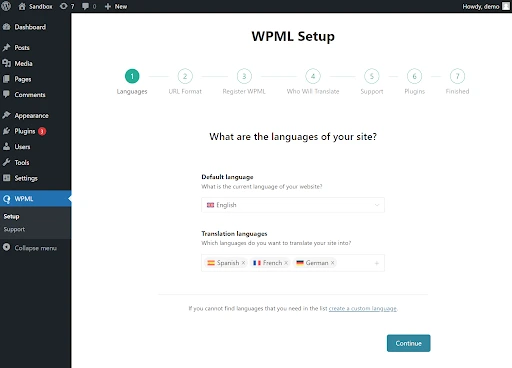
WPML (WordPress Multilingual Plugin) launched in 2008 and now powers over 1.5 million active websites across industries, from small business blogs to large-scale WooCommerce stores and enterprise content platforms. It creates linked translated copies of posts, pages, and custom post types, all managed from a central translation dashboard. WPML handles URL routing, language switching, and string translation without requiring separate WordPress installations.
Real-world usage: agencies managing 10+ language sites, global eCommerce brands running multilingual WooCommerce stores, and enterprise content teams requiring structured translation workflows with approval steps all commonly rely on WPML for its depth and reliability.
Core Features of WPML
• Automatic translation via DeepL, Google Translate, and Microsoft Azure
• Full WooCommerce Multilingual support for products, checkout, emails, and currencies
• String Translation module for themes and plugins
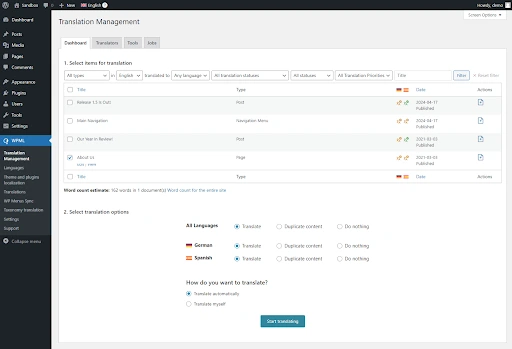
• Translation Management Dashboard for team collaboration
• Compatible with Elementor, Divi, Gutenberg, and most premium page builders
• Per-language XML sitemaps and automatic hreflang tag generation
• Partial Full-Site Editing (FSE) support improves with each WordPress 6.x release
WPML Pros and Cons
Pros: Mature plugin with 17+ years of development; excellent WooCommerce support; robust automatic translation via DeepL/Google/Azure; wide theme and plugin compatibility; 1.5M+ active installs; strong agency and enterprise adoption.
Cons: Fully premium with no meaningful free tier; steeper learning curve than Polylang; ~16 database queries per page load; FSE block theme support still catching up compared to classic themes.
Overview of Polylang
Developed by WP SYNTEX, Polylang is a freemium multilingual plugin with over 700,000 active installations. It stores translations as linked posts using WordPress’s native language taxonomy, making it lightweight and architecturally clean. Its ease of use has made it the go-to free multilingual option for independent publishers, NGOs, and startups alike.
Real-world usage: bloggers managing 2–3 language versions, startups testing multilingual viability before committing to a paid solution, and developers building headless WordPress sites via the REST API frequently choose Polylang for its minimal footprint and clean architecture.
Core Features of Polylang
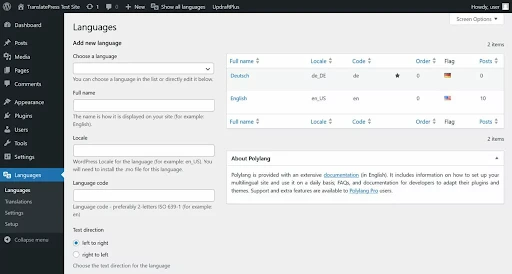
• Unlimited language support with no per-language fees
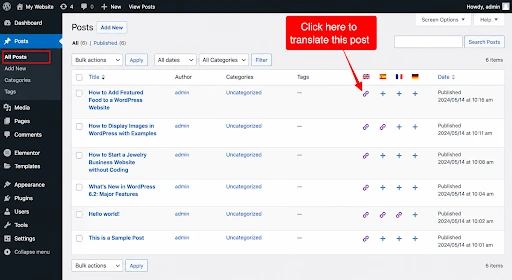
• Manual translation with content linked between language versions
• Full support for custom post types, taxonomies, menus, and widgets
• DeepL automatic translation available via Polylang Pro
• hreflang tag generation and flexible URL structure options
• Compatible with Gutenberg, classic editor, and WordPress 6.x Full-Site Editing block themes
Polylang Pros and Cons
Pros: Genuinely usable free tier; only ~4 DB queries per page load; easy to configure; strong community support; excellent FSE/block theme compatibility in 2026.
Cons: Automatic translation locked behind Pro; WooCommerce requires a separate paid add-on (€99/year); less suited for enterprise-scale workflows with large translation teams.
Feature-by-Feature Comparison: WPML vs Polylang
Ease of Use and Setup
Polylang’s setup is minimal install, choose your languages, and begin translating. WPML’s setup wizard is thorough but longer, covering string translation, WooCommerce, and language switcher placement. For teams that need to go live quickly, Polylang is the faster starting point.
Translation Methods and AI Quality in 2026
WPML supports automatic translation natively through DeepL, Google Translate, and Microsoft Translator, all managed directly within the plugin. Polylang’s free version is manual-only; DeepL integration is a Pro feature.
In 2026, AI-assisted translation quality has improved; both plugins leverage DeepL’s neural models, which produce near-human output for many European languages. However, content governance matters: WPML’s Translation Management Dashboard includes review queues and translator assignment, making it easier to enforce a human post-editing step before publishing. Polylang Pro does not yet have a built-in review workflow, so teams using it for high-stakes content should establish an external review process. Unreviewed machine translation still increases bounce rates on high-traffic pages, especially for nuanced marketing copy.
WPML vs Polylang WooCommerce Multilingual Support
WPML bundles WooCommerce Multilingual as a free companion plugin covering product translation, multilingual checkout, shipping zones, and currency switching. Polylang requires a separate ‘Polylang for WooCommerce’ add-on (€99/year). For online stores, WPML delivers a more complete solution at a lower total cost.
WPML vs Polylang Performance and Site Speed
Polylang adds approximately 4 database queries per page load, compared to WPML’s ~16. Both plugins stay under 85 KB of additional page weight. With quality caching (WP Rocket or LiteSpeed Cache), the difference becomes negligible for most sites. On high-traffic pages without caching, Polylang’s lighter footprint is a measurable advantage.
WordPress 6.x Full-Site Editing (FSE) Compatibility
With WordPress 6.x making Full-Site Editing and block themes mainstream in 2026, FSE compatibility is now a key selection criterion. Polylang has invested more in native FSE support and integrates cleanly with block themes, translating template parts and global styles more reliably. WPML’s FSE support is improving rapidly but still has edge cases with complex block theme setups. If your 2026 build is block-theme-first, Polylang currently has the edge here.
Theme and Plugin Compatibility
WPML ships with dedicated compatibility packs for hundreds of themes and plugins. Its String Translation module handles content that lives outside the post editor. Polylang is broadly compatible but may require manual string handling for niche or custom-built themes.
WPML vs Polylang SEO: Multilingual hreflang and URL Structure
URL Structure and hreflang
Both plugins support three URL structures: subdirectory (example.com/fr/), subdomain (fr.example.com), and dedicated domain (example.fr). Both generate hreflang attributes automatically, a critical ranking signal for international SEO that tells search engines which language version to present to which audience.
Common Mistake: Define your URL strategy before launching. Mixing subdirectory and subdomain structures across languages sends conflicting signals to search engines and creates duplicate content issues that are very difficult to resolve post-launch.
Integration with SEO Plugins
WPML integrates directly with Yoast SEO and Rank Math, enabling per-language meta titles, descriptions, and focus keywords from within the familiar SEO plugin interface. Polylang Pro offers the same depth; the free version requires more manual configuration and may not expose all SEO fields without additional setup.
WPML vs Polylang Sitemaps, Indexing, and Canonicals
WPML generates an individual XML sitemap for each language, ensuring all translated pages are discoverable by search engine crawlers. Polylang achieves similar results when paired with Yoast SEO. Both plugins manage canonical tags correctly, reducing duplicate content risk, a common pitfall for multilingual sites.
WPML vs Polylang Pricing Breakdown
| WPML Blog | WPML CMS | Polylang Free | Polylang Pro + WC |
| €39/year | €99/year | €0 | €198/year |
| Posts, pages, menus. No auto translation. | Custom post types + 2,000 auto translation credits/month. | Posts, pages, menus, CPTs, hreflang. | Pro €99 + WooCommerce add-on €99. DeepL included. |
WPML Credit System Explained
Active WPML licenses (CMS plan and above) include 2,000 free automatic translation credits per month. Additional credits are available at €0.75 per 1,000 characters after the monthly free allowance. For high-volume operations, monitor your credit usage from the WPML dashboard to avoid unexpected costs.
WPML vs Polylang vs TranslatePress vs Weglot: Full Comparison
TranslatePress suits non-technical users who prefer editing translations visually on the front end. Weglot is the fastest to set up but becomes expensive at scale due to word-count pricing.
WPML vs Polylang Use Cases: Which Plugin Should You Choose
| Choose WPML if… | Choose Polylang if… |
| You need WooCommerce multilingual | Budget is a concern, or you want a free tier |
| High-volume content with auto translation | 1–3 languages, manageable content volume |
| Team of translators to manage | Fastest setup time needed |
| 10+ languages planned | Headless WordPress or REST API setup |
| Complex Elementor or Divi setups | Blog, NGO, startup, or small business |
| WordPress 6.x classic themes | Full-site editing (FSE) / block themes |
Best for Developers and Customization Needs
Both plugins offer developer-friendly APIs and action/filter hooks. Polylang’s lighter footprint makes it easier to work with in headless WordPress or REST API-driven setups. WPML provides more comprehensive documentation for complex custom integrations. For custom theme development, WPML’s String Translation module is the more complete solution.
Common Mistakes to Avoid When Using Multilingual Plugins
Here are the most common mistakes to avoid when setting up WPML vs Polylang on a live site.
Incorrect URL Structure and Duplicate Content Issues
Define your URL strategy before launching. Switching from subdirectory to subdomain post-launch triggers a full URL migration one of the most disruptive SEO events for a live site.
Ignoring hreflang Implementation
Missing or malformed hreflang tags cause the wrong language version to appear in search results. Always validate using Google Search Console’s International Targeting report immediately after going live.
Poor Translation Quality and Its SEO Impact
Unreviewed machine translations that read unnaturally increase bounce rates and damage user experience signals. In 2026, both WPML and Polylang use DeepL’s neural models for AI translation. The output quality is generally high for major European languages, but nuanced marketing copy, legal text, and culturally specific content still require a human post-editing step. Always have native speakers review auto-translated content on high-traffic pages before publishing.
Final Verdict: WPML vs Polylang Which One Wins in 2026?
The WPML vs Polylang decision comes down to what your site actually needs. Go with WPML if your priority is a fully translated WooCommerce store, high-volume automated content, or managing a distributed team of translators across languages.
Go with Polylang if you’re launching a blog, nonprofit, or lean startup site particularly if you’re building on a WordPress 6.x block theme or keeping costs tight.
Whichever direction you choose, nail down your URL structure on day one. Changing it later is one of the most painful SEO migrations you can put a live site through.
Running a multilingual WooCommerce store? Manually updating translated product data across language versions adds up fast. WP Ultimate CSV Importer Pro lets you handle bulk multilingual product imports in a single CSV upload.
1. Which is better: WPML or Polylang?
It depends on what your site actually needs. Large WooCommerce stores and content teams with multiple translators will get more out of WPML’s structured workflows. Smaller sites, bloggers, and budget-conscious builders will find Polylang’s free tier more than sufficient.
2. Is WPML worth it in 2026?
For stores and enterprise sites, yes. WPML’s WooCommerce companion plugin comes at no extra cost, its AI translation pipeline is the most fully developed among WordPress multilingual tools, and the built-in reviewer assignment system saves teams significant coordination time. Solo publishers or early-stage startups should start with Polylang and upgrade only when volume demands it.
3. Is Polylang really free?
The core plugin costs nothing and is available directly from the WordPress plugin directory. DeepL-powered auto-translation and WooCommerce store support are gated behind paid upgrades.
4. Does Polylang affect SEO?
Not negatively when set up correctly, it actively helps. Polylang handles hreflang tag generation automatically, works across all three URL structures, and connects cleanly with both Yoast SEO and Rank Math. Search engines receive clear language signals, which supports stronger international rankings
5. Can I use Polylang with Elementor?
Yes. Standard Elementor pages translate without issues. If you’re using Elementor Pro’s Theme Builder or dynamic content features, you may need to do some additional configuration in Polylang’s string translation settings to cover all content areas.
6. What is the best free multilingual plugin for WordPress?
Polylang is the strongest free option available today. Without spending anything, you get support for unlimited languages, automatic hreflang output, all three URL formats, and full custom post type coverage enough for most blogs, nonprofits, and small business sites to go fully multilingual.
7. Does WPML slow down your website?
It generates around 16 database queries per page, compared to roughly 4 for Polylang. In practice, a good caching layer eliminates any noticeable difference for most visitors. The gap only becomes meaningful on very high-traffic pages served without caching.
8. Can I switch between WPML and Polylang later?
Switching is technically possible but genuinely disruptive. The two plugins store translation data differently and use separate URL structures, so migrating mid-project risks broken links and lost SEO equity. Lock in your choice before launch.
