
WordPress CSV import for agencies is one of thefaster way to manage client data at scale – without manual entry, migration errors, or repetitive updates. This guide covers how agencies use it to reduce manual work, speed up migrations, and manage client data at scale.
Key Takeaways
- WordPress agencies manage bulk data faster using CSV import plugins
- WP Ultimate CSV Importer covers posts, products, users, and custom fields across every client site you manage.
- Scheduled imports reduce manual work for WooCommerce and LMS sites
- Smart field mapping prevents errors during large-scale WordPress migrations
- CSV workflows improve agency delivery speed across multiple client websites
What is a WordPress CSV Import Plugin – and Why Do Agencies Need One?
WordPress CSV import for agencies starts with the right plugin – WP Ultimate CSV Importer lets you bring in posts, products, users, and custom fields across client sites using CSV or XML files. No coding needed, no manual entry, and no risk of data getting misplaced during the process.
Instead of manually entering or editing content, agencies can prepare a CSV file and import thousands of records in just a few clicks. It also helps maintain data consistency during migrations or ongoing updates. Agencies use it to reduce project turnaround time and eliminate data entry errors across client sites.
Key Challenges Agencies Face with Manual WordPress Data Management
Managing data manually across multiple WordPress websites creates several operational challenges for agencies:
- Repetitive manual updates
- Data inconsistency
- Import errors
- Slow migration workflows
- Higher project delivery time
- Difficulty managing WooCommerce catalogs at scale
This is why WordPress CSV import for agencies has become the standard approach for automation and bulk data handling.
| Without CSV Import | With WP Ultimate CSV Importer |
| Time-consuming updates | Faster bulk imports |
| Higher risk of errors | Structured field mapping |
| Manual product uploads | Automated WooCommerce imports |
| Difficult recurring updates | Scheduled imports |
| Slower migrations | Streamlined data migration |
| No import logs | Detailed error tracking & logs |
Why Agencies Rely on WordPress CSV Import Tools
Bulk Import Thousands of WordPress Records at Once
Agencies often need to import thousands of records, such as blog posts, products, or user details. CSV import allows them to upload large datasets in a single action, saving hours of manual effort and reducing errors.
Supports Custom Post Types and ACF Fields
Many client websites use custom post types and advanced custom fields. This tool supports both, making it easier for agencies to manage complex site structures without custom coding or plugins.
Automates Repetitive Tasks Across Multiple Client Sites
By automating repetitive data tasks, agencies can focus more on design, development, and strategy. It also speeds up website migrations, updates, and content rollouts, improving overall project delivery time.
New in 2026: Advanced WordPress CSV Import Features Agencies Are Using Now
Modern WordPress agencies are no longer relying on manual CSV uploads alone. In 2026, automation and AI-assisted workflows are becoming essential for managing multiple client websites efficiently.
WP Ultimate CSV Importer now supports advanced features that help agencies streamline large-scale data operations with less manual effort.
Smart Auto Field Mapping
The plugin can automatically suggest matching fields between CSV columns and WordPress fields, reducing manual mapping time. Significantly reduces setup time on large imports. Especially useful when onboarding new clients with non-standard data structures.
Google Sheets Integration
Agencies can sync live spreadsheet data directly into WordPress without exporting files repeatedly. Agencies managing live inventory or content calendars can sync data directly – no manual exports needed.
Scheduled Imports
Recurring imports can be automated for WooCommerce inventory updates, directory listings, and ongoing content synchronization. Set recurring imports for WooCommerce stock updates or directory refreshes – runs automatically without manual triggers.
Import Logs with Error Tracking
Detailed import logs help agencies quickly identify skipped records, formatting problems, and failed media imports. Pinpoints failed rows, broken image URLs, and field mismatches in real time so nothing slips through.
Top WordPress CSV Import Use Cases: Migration, WooCommerce & User Data
WordPress CSV import for agencies covers a variety of real-world projects where bulk data handling is essential. It simplifies complex operations like migrations, product uploads, and user management.
WordPress Website Migration Made Easy
When moving a website from one hosting environment to another or from a staging site to live, agencies use CSV import to transfer posts, pages, and media in bulk. This reduces downtime and ensures data consistency across environments.
WooCommerce Product Import
For e-commerce projects, importing products manually is not practical. Agencies use CSV files to upload product details such as price, descriptions, categories, and images in one go, making store setup and updates much faster.
User Data Import for Membership and LMS Sites
Client websites often require importing large user databases, especially for membership or LMS platforms. CSV import allows agencies to efficiently migrate or update user profiles without manual entry.
Example
For LMS sites, agencies typically import user profiles, course assignments, and access levels in a single CSV run — covering in minutes what manual entry would take days.
How Agencies Use WP Ultimate CSV Importer: Step-by-Step
Agencies that rely on WordPress CSV import for agencies follow a structured workflow when using the importer to ensure accurate and efficient data imports. This step-by-step process helps avoid errors and ensures smooth data handling across client websites.
Step 1: Prepare Your WordPress CSV File
The first step is organizing the data into a clean CSV format. Agencies map each column carefully (like title, content, price, email, etc.) to match WordPress fields. Proper formatting at this stage is critical to avoid import issues later.
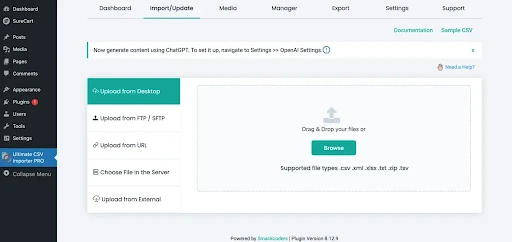
Step 2: Upload CSV and Map WordPress Fields
Next, the CSV file is uploaded into the plugin. The tool allows users to map CSV columns to WordPress fields such as posts, custom fields, or WooCommerce attributes. This ensures that each piece of data goes to the correct location.
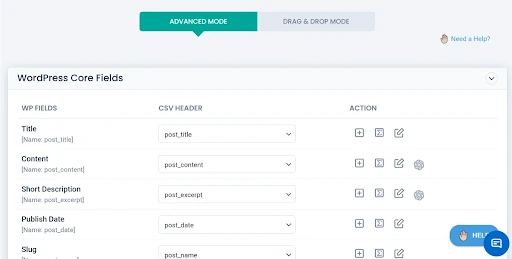
Step 3: Run the WordPress Import and Validate Data
Once mapping is complete, the import process is executed. Agencies then validate the imported data by checking sample entries, ensuring images, fields, and relationships are correctly imported without duplication or errors.
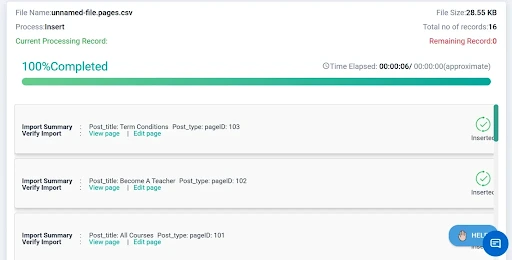
Step 4: Schedule Recurring WordPress Imports
For recurring updates, agencies can schedule automated imports to sync client website data regularly. This is especially useful for WooCommerce inventory updates, directory websites, and large content-driven platforms.
Step 5: Review Logs and Fix Import Errors
After the import is completed, agencies review import logs to identify skipped records, formatting issues, or failed image imports. This helps maintain data accuracy and ensures smoother future imports.
Best Practices for WordPress CSV Import for Agencies
- Always validate the CSV file before importing – check column headers, formatting, and data types
- Run a small test import of 5–10 rows before processing the full dataset
- Back up the WordPress site before every large import
- Use a staging environment before importing into live client sites, especially for WooCommerce stores
- Document field mapping templates per client niche – LMS, e-commerce, directory – and reuse them across similar projects
- Always define a unique identifier like SKU or email before running update imports to avoid duplicate records
Common Mistakes to Avoid When Importing CSV in WordPress
Even experienced agencies can run into issues during CSV imports. One common mistake is using incorrect column headers, which causes mapping failures. Another is importing large files without testing smaller batches first, leading to timeout issues.
Broken image URLs are another frequent problem, especially during WooCommerce imports. Many agencies also forget to back up the site before importing, which creates unnecessary risk.
Running a test import, validating field mapping, and checking server limits before large imports can prevent most of these problems.
Conclusion
The agencies that get the most out of WordPress CSV imports are the ones that treat it as a system, not a one-off task. Build your field mapping templates once per client niche, schedule the recurring imports, and review the logs after every run. That’s when the time savings compound across every project you take on. Start managing client WordPress data more efficiently with WP Ultimate CSV Importer. [Try Free →]
1. What is the best WordPress CSV import plugin for agencies?
WP Ultimate CSV Importer is the best WordPress CSV import for agencies tool because it supports bulk imports, WooCommerce products, custom post types, users, and scheduled automations.
2. Can I import CSV files into WordPress without coding?
Yes. WP Ultimate CSV Importer requires no coding. Agencies can import posts, WooCommerce products, users, and custom fields using a simple upload and field mapping interface.
3. How do agencies use WordPress CSV import tools for client data management?
Agencies use WordPress CSV import for agencies to manage bulk client data such as blog posts, WooCommerce products, customer records, and user profiles. These tools help automate migrations, reduce manual work, and improve workflow efficiency across multiple client websites.
4. Does WP Ultimate CSV Importer support WooCommerce product imports?
Yes, WP Ultimate CSV Importer supports WooCommerce product imports using CSV or XML files. Agencies can import product names, SKUs, prices, categories, images, and inventory data in bulk, making WooCommerce store management much faster.
5. What is the fastest way to migrate WordPress data using CSV?
The fastest way is to export existing data as CSV, clean and map it to WordPress fields, then use WP Ultimate CSV Importer to bulk-upload everything in one run – including posts, users, products, and custom fields.
6. Does WP Ultimate CSV Importer support scheduled automatic imports?
Yes. Agencies can set up scheduled imports to automatically sync WooCommerce inventory, directory listings, or recurring content updates without manual intervention.
